
Building the upload pipeline that replaces a document cleanly
First write, replace, and delete share one bundle contract so derived content dies with the bytes, history is archived, and a failed conversion never advertises a half-written file.
This article is the technical pair for Replacing a document is harder than uploading one. The business pair makes the case for treating replace as a bundle operation; this one is about the technical implementation.
It also builds on Giving your documents a proper home and on The architecture of AI-native document management software.
A successful PUT can still serve the previous file
Most teams judge an upload pipeline by whether the PUT returns 200 and the file appears in the list, which is the demo, while the production test is whether search still cites the previous clause, whether preview still paints the old layout, and whether a live extract is still the one posted last week.
A same-name write looks like one blob operation when you only watch the list. In this platform it is a mutation of a bundle. The original bytes are only the first item. The document home also holds a canonical rendition, sidecars for layout, figures, and tabular row groups, search chunks, and operational records for tags and extraction. If those siblings don’t move with the bytes, the list is current and the rest of the system is still answering from yesterday.
Where this sits after the document home
Giving your documents a proper home settled the containers (original, {container}-canonical, dedicated layout and figure stores) and named overwrite as a lifecycle problem. This piece is the mutation contract on that home, covering when a PUT is a first write, when it is a replace, what has to die, what has to be archived, and what happens when canonical conversion can’t finish.
The indexing pipeline still turns a ready canonical file into chunks. The upload path doesn’t start that indexer. It only makes the previous generation unfindable and leaves a new canonical the indexer can pick up. Office-to-PDF conversion is a gate on this path; the conversion service itself belongs in a later article.
Where things go wrong
The naive upload writes the original blob, returns 200, and hopes every derived store notices. Shared drives work that way. An AI document system that does this ships a current list on top of stale chunks, stale layout, and live extracts that still belong to the previous bytes.
The second trap is overwriting the live original before the new canonical copy exists. Conversion of a Word file to PDF can fail, time out, or lose a race with another writer. If you already replaced the live bytes, preview and indexing have nowhere honest to go, even while the list says the new file is in and the rendition that actually feeds the system is missing or half-written.
The third trap is treating leftover artifacts as “eventual.” Search doesn’t watch the file. Old chunks stay queryable until you delete them. A replace that only writes new bytes and waits for the next indexer run can retrieve both generations at once, which is worse than a short gap with no hits.
The quieter cousin is a silent race. Two people confirm a replace on the same name. Without the blob’s ETag on the write, the second PUT can erase derived artifacts that still belong to a newer generation, or commit on top of a file that changed after the confirm dialog. Confirmation without a conditional write is theater.
The upload pipeline as a bundle contract
The upload route is an HTTP PUT on Azure Functions. Same container and same name is the identity of the document. Three operations share one contract:
- First write. The name isn’t there yet. Store the original, start a canonical generation, and don’t tell the client the document is ready for preview until that generation commits.
- Replace. The name is already there. Keep the live original and its ready canonical copy until the new generation commits, then delete content derived from the previous generation and archive operational history.
- Remove. Delete is the same split in reverse. The visible file and every content-derived sibling go together, and history is archived so the trail survives.
Then you split two kinds of state, because they have opposite jobs.
Content-derived artifacts have to match the current bytes. The canonical rendition, layout JSON, figure crops, tabular row-group sidecar, and search chunks sit in this group. They are deleted by generation. Each canonical blob lives at a path keyed by a stable document id (kept on the original across replace) and a conversion job id (new on every successful generation), so deleting yesterday’s tree can’t collide with today’s. Layout, figures, and the tabular sidecar follow that same id-plus-generation shape.
Operational history has to survive the replace. Extraction records in Azure Cosmos DB, tag audit history, and the audit rows written when figures were captioned and chunks were given context answer what happened to this document, including work that already went downstream. Archive them on the stable document id, keep them findable, and free the live slot for the new version.
The document id is why archive stays attached to the file identity after a replace. The conversion job id is why cleanup can target one generation without guessing.
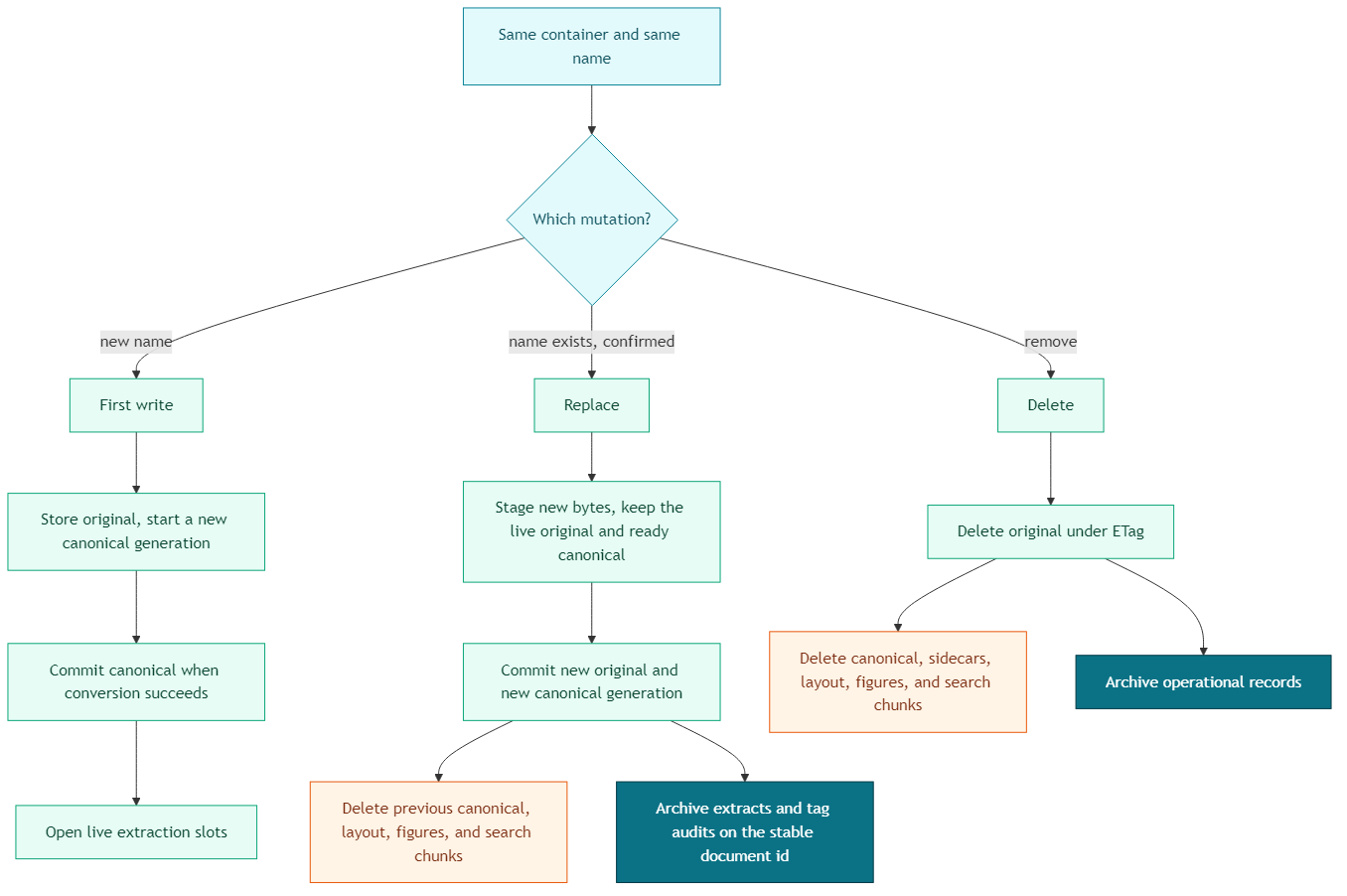
The decisions that keep replace honest
Same name is a replace, and it needs a confirmation plus an ETag
Before any durable write, the handler rejects an oversized body (configured limit, default 100 MB, hard cap 250 MB) so a huge PUT never lands “then fails later.”
If the blob isn’t in the container, this is a first write. The original is stored with If-None-Match set to *, so a concurrent create on the same name can’t silently become a replace.
If the blob is already there and the request didn’t confirm overwrite, the handler returns 409 with enough for the client to ask the user and retry safely.
{
  "requiresConfirmation": true,
  "fileName": "supplier-contract.docx",
  "container": "production",
  "etag": "0x8D..."
}
A confirmed replace has to send that ETag back (x-source-etag, the value from the 409 body, plus x-overwrite: true to mean the user confirmed). If the live ETag no longer matches, the handler returns 409 again. The file changed after the dialog; refresh and confirm the generation you can actually see.
Those HTTP checks still have to be enforced at storage. The same ETag conditions on the blob are what make the confirm real.
# First write: refuse if the name already exists.
blob_client.upload_blob(data, match_condition=MatchConditions.IfMissing)

# Confirmed replace: refuse if someone else wrote since the 409.
blob_client.upload_blob(
    data,
    overwrite=True,
    etag=confirmed_etag,
    match_condition=MatchConditions.IfNotModified,
)
If the file type isn’t indexable, there is no canonical copy to wait for. The conditional write of the original is the commit. Cleanup of any leftover canonical tree from a previous generation runs only after that write succeeds, so a lost ETag race can’t erase derived artifacts while the prior source bytes are still in place.
Indexable replace stages bytes and commits the original last
Indexable files need a canonical rendition (PDF or image) before preview and the indexing pipeline should treat them as current. Office conversion goes through Microsoft Graph; if that converter isn’t configured, the upload fails closed with 503 and stores nothing that preview can use.
A first write stores the original immediately, marks canonical status pending, and runs (or queues) conversion. The list can show the file with an honest pending status. Ready means the new canonical blob is committed and the skip flag that keeps Azure AI Search off that candidate is cleared. Failed means preview isn’t advertised; the client gets 422 when conversion dies inside the request.
A replace of an indexable file leaves the live original in place until the new canonical exists. New bytes go to a private staging container. The live blob is marked replacing, still serving the previous original and the previous ready canonical copy. Conversion reads the staged bytes and writes a new canonical generation under a new job id, with search still skipped on that candidate. Only when that candidate is fully written does the worker commit the original, under If-Not-Modified against the ETag from staging, and point the source metadata at the new canonical name. Then, and only then, cleanup runs against the previous canonical name.
If conversion fails, or the ETag race is lost, the previous ready generation stays. Replacement status is failed. The list doesn’t get to pretend the new file is the one preview and search are reading.
When conversion is queued, the PUT can return pending while the worker finishes. That pending state is visible, and the live file stays the previous generation until commit.
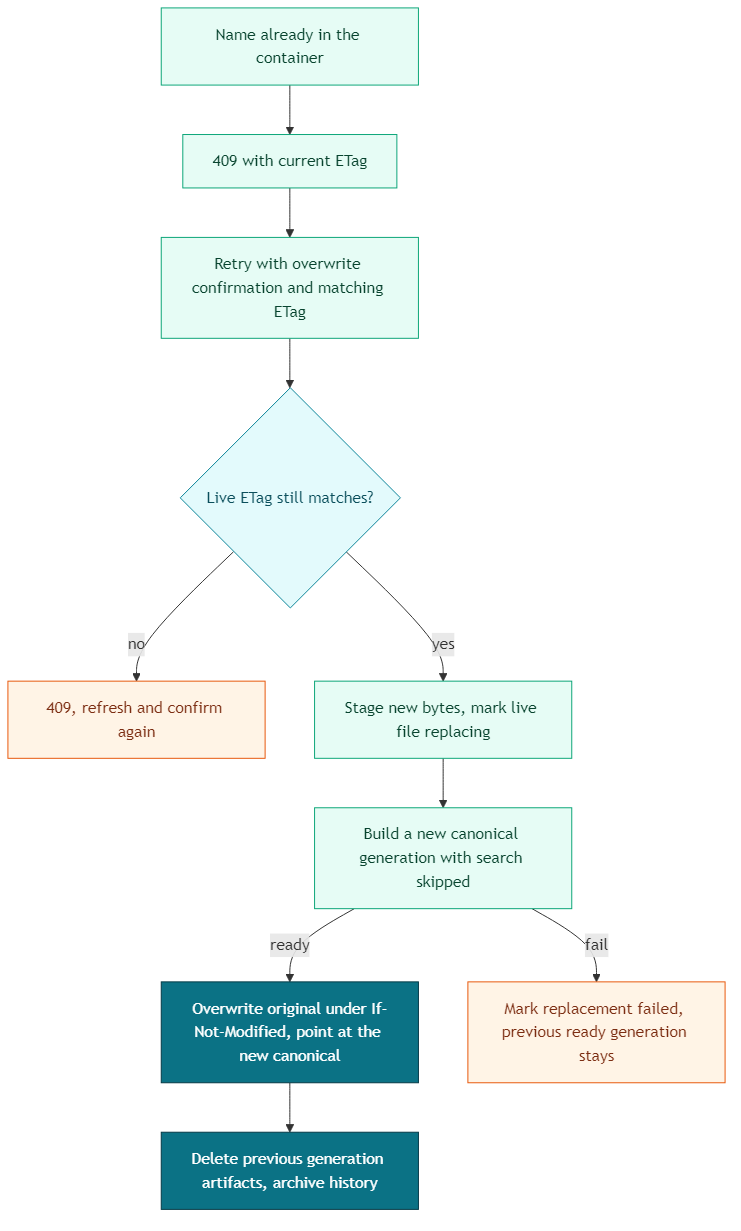
Spreadsheets and CSV files take one extra write on that same commit. Row groups are extracted from the staged original and stored as a JSON sidecar beside the new canonical blob, so the indexing pipeline doesn’t send a workbook through layout extraction. That sidecar is part of the generation. It dies with the canonical file it belongs to.
Cleanup deletes one generation, archive keeps the document’s history
After a successful replace commit, cleanup is scoped to the previous canonical name:
- delete search chunks for that canonical file so retrieval can’t cite the old clause
- delete the previous canonical blob, its tabular sidecar, its layout JSON, and its figure crops (figure deletes are batched under Azure’s 256-blob limit)
- archive extraction records and document audit rows on the stable document id, marked as overwritten
Blob and index deletes are safe even if a newer generation already committed, because they address the old path. Archive is whole-document, so it runs only while the committing job still owns the ready generation. A superseded job can’t archive the live records that now belong to the file that replaced it.
The upload response still carries indexer_triggered: false, a flag that tells the client no full reindex was started. Old chunks are already gone if cleanup succeeded. New chunks appear when the indexing pipeline processes the new canonical blob. A short gap with no hits is the honest window, and mixed generations in one result set is the bug.
Business tags on a replace come from the new upload. The stable document id and other system identity fields stay. When canonical status becomes ready, live extraction slots for the document’s types are created (or re-created) against that same id.
A list-changed event and a canonical-status event go to the container group so the UI can refresh without polling. The event plumbing is its own article; here it is just the signal that the bundle moved.
Delete uses the same split, in reverse
Delete snapshots the source ETag and canonical pointer, then deletes the original under If-Not-Modified. If a conversion commit lands in between, the delete retries with a fresh snapshot (up to three times), which keeps the new generation’s artifacts attached to the live file.
Once the original is gone, cleanup and archive run concurrently (index, canonical, layout, sidecar, figures, in-flight staging, leftover replacement candidate, extraction archive, audit archive). Each unit is best-effort. The original delete already succeeded, so the operation is a success for the caller. Failed units are logged as leftovers to remediate, because a user who asked to remove a file shouldn’t keep being retrievable from search.
If a replace was in flight, delete also removes the staged bytes and the candidate canonical that isn’t on the source pointer yet. Otherwise an abandoned overwrite leaves a private copy of the file in staging and a PDF the indexer is told to skip, owned by nobody.
Reality check
None of this is one atomic transaction across Blob Storage, Azure AI Search, and Cosmos DB. Search cleanup, sidecar cleanup, and archive can each fail on their own clock. You budget for leftovers and retries, or you discover them when someone cites a deleted file. Generation-scoped names make those retries targeted. They don’t make them free.
This model is overwrite. You don’t keep N generations of the file unless you chose that product. The previous canonical tree is deleted on purpose. If legal needs the previous PDF as a record, that’s a retention design (archive copy, named version, export). Leaving stale chunks in the search layer just pollutes retrieval.
History that survives is also a retention decision. Archived extracts and tag audits are operational data, and sometimes personal data. Keep them because someone will ask why a tag was applied, and have a rule for how long and who can see them. Keeping every derived file forever isn’t a policy.
Queued conversion makes the PUT fast and the pending state visible. It also means the worker has to be idempotent. A replay after commit can’t rebuild the canonical file, and it can’t archive operational records if a newer generation already owns the live pointer. Staging blobs expire as leftover jobs; they aren’t a second document home.
Org habit will still create two bundles where the process needed one. _final_FINAL is a second document id, a second canonical tree, and a second set of chunks. The pipeline will be perfectly consistent about both of them.
Conclusion
The instinct after you have a document home is to celebrate any PUT that lands in the list. That’s how teams ship a current file list on top of yesterday’s search, yesterday’s preview, and yesterday’s extract.
An upload pipeline that can replace a document treats first write, replace, and delete as one bundle. It confirms a same-name write with an ETag, stages new bytes until a new canonical generation commits, deletes the previous generation’s derived artifacts, archives history on the stable document id, and leaves the version that already works in place when conversion fails. The list is current only when that bundle is current.
Ideas, opinions, and tone are mine. AI helped with the language.
For more articles on AI-native document management visit the pialgorithms blog.
pialgorithms | document management software | ai engineering services