
Building the search layer that makes documents findable
How hybrid retrieval, filters, permissions, ranking, and citations turn stored documents into usable results
This article is the technical pair for A better way to search documents. The business pair makes the case for treating findability as its own design problem on top of the document home; this one is about the technical implementation, in particular how that search layer is built on Azure AI Search.
It also builds on The architecture of AI-native document management software, which introduced the storage, processing, search, query, and action layers. Where should your documents live? made the business case for one document home; Giving your documents a proper home described how that home is built on blob storage.
A search system, not a search bar
Once a document home is in place, every AI capability above it becomes a customer of the same retrieval layer. The chat answer, the structured extraction, and any other workflow built on top of the search system, call the same search code with the same scoping. So when those features feel unreliable, it is the search underneath that is usually the problem.
Designing a search system for AI-powered retrieval is a different exercise from putting a search bar on a folder tree. The unit of retrieval moves down to the chunk, the query combines keyword and meaning, the filters reflect business attributes rather than file properties, every result comes back with a source the user can verify, and the whole thing runs inside a permission scope rather than relying on the UI to hide what the user is not allowed to see. The mechanics below are how those properties are built in a modern AI-powered document management system.
The architecture of the search layer
Two halves do the work. A write path takes a blob in the document home and produces searchable chunks on the index. A read path turns a user query into ranked chunks with citations the caller can act on. The write path is its own substantial design problem and will get its own articles so that it is thoroughly explained, so here it is enough to know what arrives on the index and why it is shaped that way. Everything else in this article is the read path and the index design that makes it possible.
The rest of the article walks through six pieces:
- The index, where chunks live
- Hybrid retrieval, keywords plus meaning
- Filtering by business meaning before ranking
- Citations, every result with a source
- Keeping the index aligned with the document home
- Permissions inside every query
1. The index, where chunks live
The unit of retrieval is the chunk, not the document. One blob becomes many chunks on a single Azure AI Search index, and the chunk is the row the system inserts, updates, deletes, ranks, and returns to the caller.
Each chunk carries a fixed set of fields:
chunk_idis the document key that every partial update or delete operation targetschunkholds the paragraph or tabular row group text (from Excel and CSV files) the user is looking forpageNumbercarries the page the chunk came from, so a citation can point the reader at the exact spottitlecarries the canonical blob namecontainercarries the original source Azure Blob Storage container, so the chunk is always traceable to a real file.text_vectoris the embedded representation, populated at indexing time.chunk_contextstores a short context prefix for the chunk. For text and tabular chunks it is produced by contextual retrieval during indexing, so a paragraph that says ”as described in Section 3.2 above” arrives at the model already grounded. Forimage_captionchunks it holds the Document Intelligence figure caption when the layout model found one under the figure; otherwise it stays empty.chunk_kinddistinguishes prose chunks, tabular row groups, and image captions, which matters for citation rendering downstream.- On top of those, the index carries a configurable set of business tag fields, so adding a new category like
document_type,supplier, orregionis a schema change rather than a code change.
There is no explicit parent_id field tying chunks back to their blob. The pair (title, container) does that job, and every cleanup, tag update, and citation operation uses it as the implicit foreign key. chunk_id is what makes each chunk addressable for direct edits, which enables the partial-update path in paragraph 5 below.
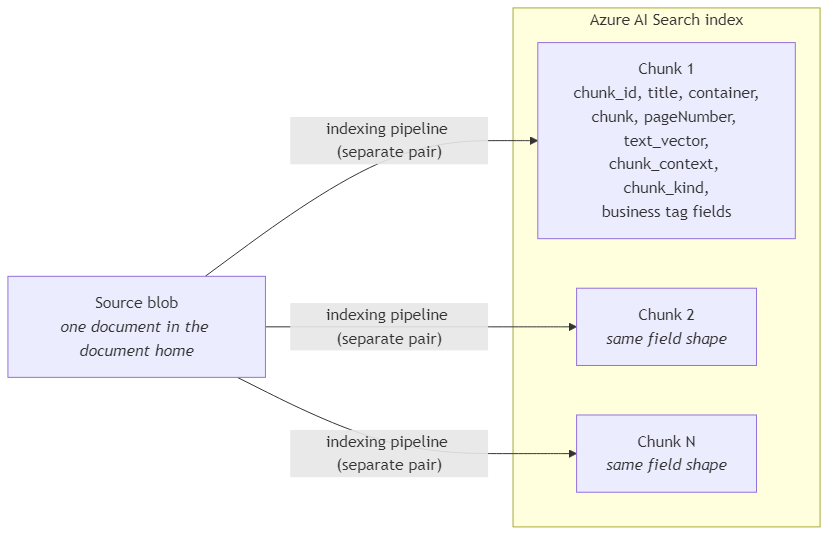
The chunks themselves are produced by a separate indexing pipeline that runs Document Intelligence layout extraction, character-window chunking with overlap, per-chunk contextual enrichment, and image captioning, stitched together as custom Web API skills hosted on Azure Functions. That pipeline is the focus of the next technical pair in this series; for now it is enough to know that the chunks arrive on the index already shaped, with chunk_context filled where it applies and chunk_kind set.
2. Hybrid retrieval, keywords plus meaning
In real production environments, search has to handle both exact wording and meaning. A user may search for a clause number, product code, or supplier name, but they may also describe an idea using different words from the document. For that reason, the search call combines lexical retrieval and semantic retrieval in one request.
The application sends the user’s query as normal search text, and also sends it as a vector query against the text_vector field using VectorizableTextQuery. This means the application does not create the embedding itself before calling Azure AI Search. Instead, it sends the raw user text, and Azure AI Search converts that text into a vector inside the search service. This is called integrated vectorization.
Azure AI Search then runs the keyword search and the vector search together, merges the candidate results internally, and returns one hybrid search result list. Because the application does not need a separate call to an embedding model before searching, retrieval stays simpler and faster.
After hybrid search returns its candidate results, a semantic ranker performs one final relevance check. It reorders the results so the chunks that best match the meaning of the query appear above weaker matches. Technically, this is a second-level relevance pass (L2 ranking step), because it runs after the first retrieval stage has already produced a candidate set. This is the same semantic ranking step described in the business pair, and it happens just before the top results are returned to the application (e.g. the chat interface).
3. Filtering by business meaning before ranking
The same filter-building logic is used by every service that calls search, including chat and extraction. This keeps filtering behavior consistent across the platform, regardless of which service initiated the search.
Before the search request is sent to Azure AI Search, user-selected filters are converted into a single OData filter expression. Different tag categories, such as supplier, client, document type, or any user-defined business tag, are joined with and, because the result has to match all selected categories. Multiple values inside the same category are joined with or, because the result can match any of those selected values. Business tag fields are stored as string collections in the index, so each selected value is expressed as a collection membership check (any) rather than a scalar equality test. The UI key document is rewritten to the index field title and still uses scalar equality, because document name is not a multi-value tag field.
This filter is applied before retrieval, not after, and that distinction matters for cost, quality, and latency. Cost improves because vector and keyword scoring only run on documents that already match the filter instead of across the whole index. Quality improves because filtering by business meaning removes much of the noise before top-k ranking runs. Latency improves because a smaller candidate set is faster to rank and return.
The tag schema is configuration-driven, so adding a new business attribute means updating configuration and adding a new index field, not rewriting the search logic. The mechanics make filtering cheap and repeatable.
4. Citations, every result with a source
Every chunk returned by the search call already carries the fields needed for citation. Alongside the chunk text, each result includes title, pageNumber, container, chunk_kind, and chunk_context. With those fields, the application can build a reference such as “Document X, page Y, container Z” without making a separate lookup against the storage layer.
In the RAG chat path, those same fields render the inline citation buttons in the response, and clicking a citation opens the source document in the preview at the exact page the chunk came from.
The search layer always returns source metadata with every result, so every service above it can rely on that metadata being present.
5. Keeping the index aligned with the document home
The search index has to stay aligned with the current state of the document home. The platform uses two different update paths depending on what changed.
When only tags change, either through manual tagging or AI smart-tagging, the index is updated directly without running the indexer again. The platform finds all chunks that belong to the same (container, title) pair and updates their tag fields directly in Azure AI Search, keyed by chunk_id. This makes tag corrections available quickly, which matters when a user fixes a tag and immediately runs the same filtered search again.
When a document is overwritten or deleted, the platform removes the indexed chunks for that document as part of the same cleanup flow that removes the related storage artifacts (canonical file, layout JSON, tabular row-group sidecar, and extracted figure images). It finds all chunks for the same (container, title) pair and sends a batch delete based on the chunk_id.
This cleanup is deterministic because every indexed chunk can be traced back to its source blob. As a result, the search index does not keep serving chunks from a document that has been replaced or deleted.
6. Permissions inside every query
The user’s allowed containers are resolved before the search request is built. The user’s roles come from Microsoft Entra External ID group membership through the Easy Auth signed-principal header. Those roles are then mapped, through configuration, to the source containers the user is allowed to search. The result is the user’s search scope. The identity model itself belongs to a later technical article in this series.
That scope is enforced inside the search query, not after results come back. The application builds a container filter from the allowed containers, intersects it with any containers the user selected in the UI, and refuses to call Azure AI Search if the final container set is empty. In that case, the search-params builder raises this exception: Search rejected: no container filter could be constructed (empty allowed_containers). This is the read-path version of returning a 403 instead of failing open.
The container filter is then added to the same OData expression as the business-tag filters from subsection 3. This means every search call enforces both scopes at the same time: the security scope, which controls what the user is allowed to see, and the business scope, which controls what the user asked to filter by.

Reality check
Search has real costs that grow with usage. Vector storage grows with the number of indexed chunks, query compute is paid on every interactive search call, and contextual retrieval adds an extra LLM call during indexing so each chunk has better context at query time. Each cost may look small on its own but at scale they become meaningful. The search layer is therefore something to budget for deliberately, and not something to discover accidentally later.
Adding a new business tag category also has a cost. The platform makes filtering and partial updates efficient, but the new tag still has to be added to the index schema and to the configuration. A partial-update pass can update chunks that already have the field available, but it cannot magically fill a new field for old chunks unless the system runs a backfill or reindexing process. Schema evolution is cheaper than rebuilding the whole index, but it is still a planned operation, not just a configuration switch.
Tag governance matters just as much. The mechanics make filtering and partial updates efficient, but the value of those filters depends on a consistent tag vocabulary and on someone reviewing, accepting, or correcting AI-suggested tags. Without that ownership, the system may remain technically correct but operationally useless. Better vectors will not fix bad taxonomy.
Conclusion
The search layer sits between the document home and every AI capability the platform exposes. Treating it as core infrastructure and not as a nice-to-have feature added later, is what makes chat answers, extractions, and workflows trustworthy.
The search layer’s guarantee is that every returned chunk can be retrieved, ranked, filtered, cited, refreshed, and scoped to the right user. Once that guarantee is stable, the services above it do not need to solve retrieval again. They can rely on the search layer to return usable, traceable, and authorized chunks.
The next pair in this series turns to the indexing pipeline that produces those chunks. It walks through the data source, the indexer, and the custom Web API skills that decide what the search layer can find and what it silently misses.
Ideas, opinions, and tone are mine. AI helped with the language.
For more articles on AI-native document management visit the pialgorithms blog.
pialgorithms | document management software | ai engineering services