
Replacing a document is harder than uploading one
The file list can look current while search, preview, and extracts still answer from yesterday.
When the file list looks current
Someone in legal drops a revised supplier contract on top of the file that has been sitting in the shared container for six months, same name and same place, and the list updates with a fresh date. Replacing a document looks like a single write when you only watch the file list, and the thread gets the usual “done, the new version is up.”
Then operations asks the chat app what the liability cap is, and it quotes the old number with a citation that opens the right filename on the wrong clause. Finance still has an extract posted last week, built on the previous bytes. Preview still lights a highlight that was computed from the layout of the file you just replaced. Nothing in the upload failed; replacing a document only updated the bytes people can see in the list, while the rest of the system was still answering from yesterday.
Where this sits after the document home
Where should your documents live argued that scattered storage is a business decision, and giving documents a proper home showed what that home looks like as original file, canonical rendition, and derived sidecars. Those pieces settle where a document lives. They only named the next problem, which is what has to happen when that home changes.
This series already walked a document through the search layer, the indexing pipeline, consistent tags, grounded answers, the point where chat is not enough, a workflow engine, and extraction you can consume and audit. Each of those layers stores something derived from the current bytes. The architecture overview put them on one map. This piece is the first operational question after that map, which is whether a replace moves search, preview, and extracts along with the file at the top.
Where things go wrong
The common trap is treating upload as a single write. You put a file in storage, the list shows it, and the job is done. That’s a filing-cabinet instinct, and it’s how most shared drives actually work. In an AI document system it’s how you get a current list sitting on top of a stale brain.
The second trap is treating overwrite as same path, new bytes. The filename didn’t change, so teams assume every downstream consumer will notice. The search layer doesn’t watch the file. Layout from the indexing pipeline doesn’t rebuild itself because the date in the list moved. An extract that already exists doesn’t become invalid just because someone dropped a new PDF on the same name.
The third trap is treating delete as removing the visible file. The list entry goes away. The chunks, the layout sidecar, the cropped figures, and the live extract can all stay. Users then retrieve a clause from a document that “isn’t there,” which is a worse lie than a missing file, because the system still sounds sure.
The quieter cousin of all three is never replacing at all. People upload contract_v2_final.pdf beside contract.pdf because they don’t want to lose the old one, or because the confirm dialog made them nervous. Now you have two live documents, two sets of chunks, two extracts, and nobody can tell which one the process is supposed to use.

What replacing a document actually has to do
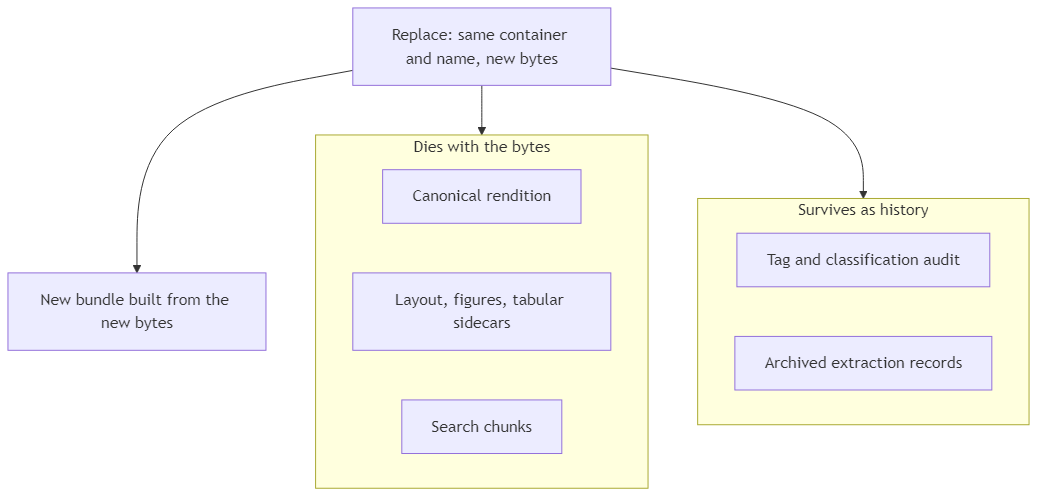
A document in this system is a bundle with a shared lifecycle. The original bytes are only the first item. The document home also holds a canonical rendition for preview and indexing, sidecars for layout, figures, and tabular row groups, search chunks that chat and retrieval actually read, and operational records for tags and extraction.
Three operations act on that bundle:
- First write. A new name in a container creates the bundle. If conversion or storage can’t finish, the honest product doesn’t leave a file that looks stored and isn’t usable downstream.
- Same-identity write. Same container and same name is a replace. Content derived from the previous bytes must die, or the new file is a costume over the old document.
- Remove. Delete is the same rule in reverse. The visible file and every content-derived sibling go together.
Then you split two kinds of state, because they have opposite jobs.
Content-derived artifacts have to match the current bytes. Canonical preview, layout, figure crops, tabular sidecars, and search chunks sit in this group. If they outlive a replace, chat cites the old clause and auditable extraction highlights the old region.
Operational history has to survive the replace. Who tagged the document, whether a model or a person did it, and the extraction records that were already posted answer what happened to this document, including work that already went downstream. Archive them, keep them findable, and free the live slot for the new version. Erasing that trail because someone dropped a new file is how you fail the next audit.
That’s the business decision, and the pipeline only enforces it.
How to tell a replace from a second document
This gives you a practical test for any upload that looks like an update.
If the name and container match, treat it as a replace. Confirm it on purpose. Then assume every content-derived sibling of the old version is now wrong until it has been rebuilt from the new bytes.
If a file type can’t be indexed, store it if you must, and don’t pretend the search layer can find paragraphs that were never written into the index.
If conversion to the canonical rendition can’t finish, don’t advertise a finished document. Preview and indexing wait until that rendition actually exists. For a replace, the version that already works stays in place until the new one commits. A list entry that says uploaded while preview and search still belong to a failed conversion is how trust dies.
If someone will later ask why a tag was applied, or why an extract had those field values last quarter, that trail has to survive the replace. History is the only honest answer to a process question.
If search or preview still returns the old clause after a replace, cleanup failed, even if the list looks right. Judge a replace by whether search, preview, and extracts are already reading the new bytes.
If people keep uploading a new filename for every revision, the pipeline can’t invent a single live document for them. _final_FINAL is an organizational habit that creates two bundles where the process needed one. Naming policy is part of replace, whether you like it or not.
Reality check
Cleanup isn’t one atomic click. Search, sidecars, preview, and workflow records can each fail on their own clock. You budget for leftovers and retries, or you discover them when someone cites a deleted file.
This model is overwrite. You don’t keep N generations of the file unless you chose that product. If legal needs the previous PDF as a record, that’s a retention design (archive copy, named version, export). Leaving stale chunks in the search layer just pollutes retrieval.
History that survives is also a retention decision. Audit trails and archived extracts are operational data, and sometimes personal data. Keep them because someone will ask, and have a rule for how long, and for who can see them. Keeping every derived file forever isn’t a policy.
Org habit will create ghosts no pipeline can merge. If two teams each keep their own filename for the “same” contract, you have two homes. The system will be perfectly consistent about both of them.
Conclusion
The instinct after you have a document home is to celebrate any upload that lands in the list. That’s how teams ship a current file list on top of yesterday’s search, yesterday’s preview, and yesterday’s extract, then wonder why the AI sounds sure and is still wrong.
Upload is the demo, and replacing a document (or deleting one) is the production test of whether the home still holds after the bytes change. The list is current only when the bundle is current, and history is the one thing that should outlive the bytes.
The technical pair for this piece is Building the upload pipeline that replaces a document cleanly.
Ideas, opinions, and tone are mine. AI helped with the language.
For more articles on AI-native document management visit the pialgorithms blog.
pialgorithms | document management software | ai engineering services