
Giving your documents a proper home
A technical deep dive into the storage layer behind an AI-powered document platform
This article is the technical pair for Where should your documents live?. The business pair makes the case for where documents should live and what a document home must do; this one is about the technical implementation on Azure Blob Storage.
It also builds on The architecture of AI-native document management software, which introduced the storage, processing, search, query, and action layers. Some of those services appear here too, but only where they touch the storage layer.
Documents need one place to live
Before users can reliably preview a document, search its contents, ask questions about it, extract structured data from it, or trigger workflows from it, that document needs to live in a single source of truth.
That source of truth is what makes those actions possible. It is where the:
- original documents live, stored exactly as uploaded
- metadata is attached: file type, user-defined business tags, indexing state (whether the Azure AI Search pipeline should include, skip, or reject the document), and other operational metadata
- canonical representations are stored: PDF or image representations used for document previews and for Azure AI Search indexing, so the documents become queryable by downstream RAG and extraction services
- derived artifacts are stored or referenced: the document’s layout stored in JSON format, tabular data stored in a JSON row-group sidecar, and extracted figures from the document, all used again by downstream RAG and extraction services
Each downstream service should point back to that same document home, not to a copy. The storage layer is therefore not just where the bytes sit, but is the foundation for search, preview, tagging, extraction, audit, and workflow state. And that foundation has to be designed deliberately.
The architecture of the document home
The storage layer is organized around a few distinct categories:
- source containers
- canonical storage
- derived artifacts
- blob metadata
- lifecycle management
- access paths
The rest of this article walks through each one.
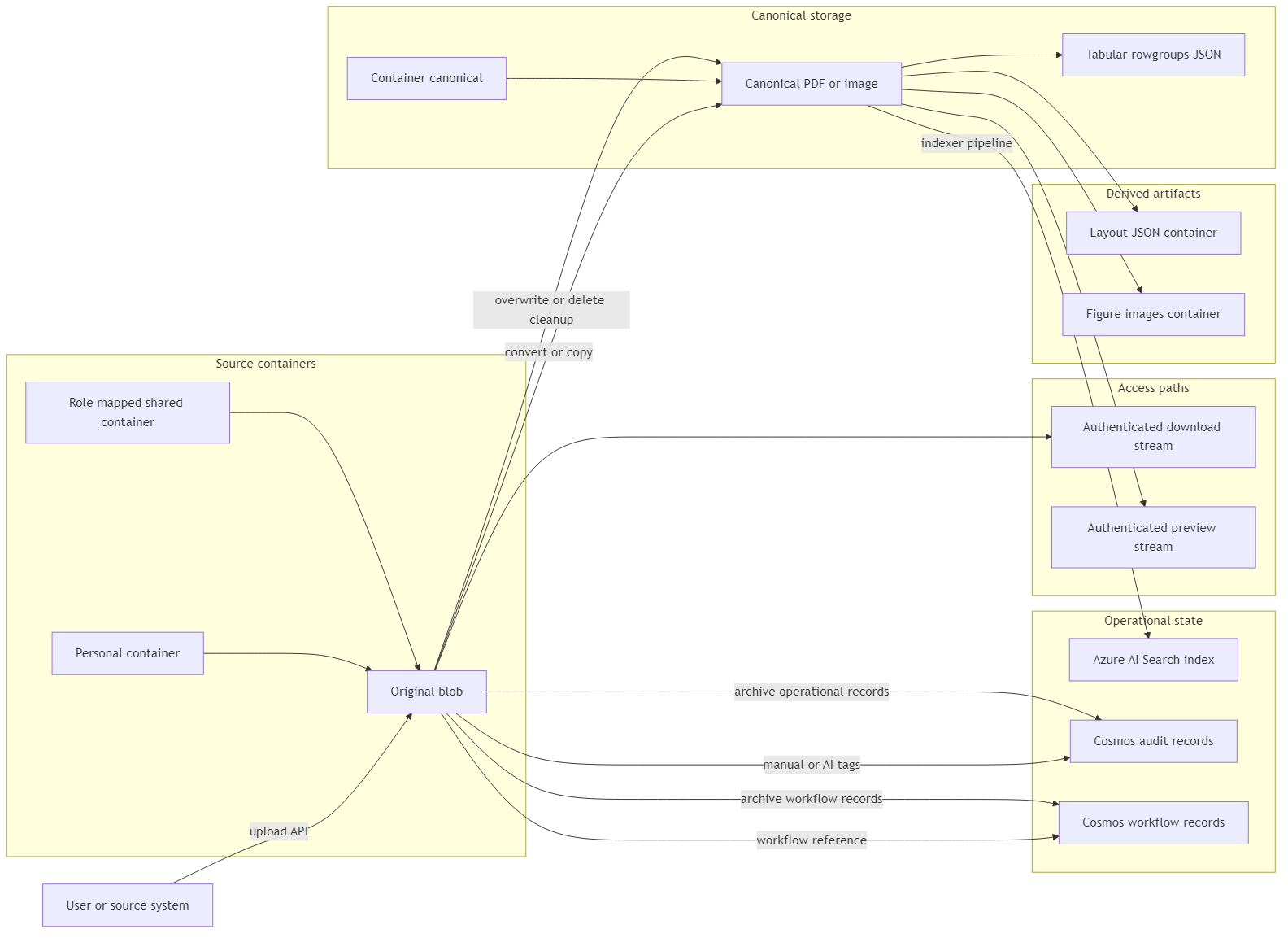
1. Source containers: where original documents live
At the heart of the storage layer are the source containers. These hold the original uploaded files (blobs), stored exactly as received.
A personal document lives in a user-specific container derived from the user’s Microsoft Entra object identifier, so each user gets a private storage container tied to their identity. Shared documents live in role-mapped containers, where application roles resolve to allowed storage containers through configuration. The distinction between personal and shared documents is important because container design is not just a folder hierarchy, but is a part of the permission model.
The application resolves the user’s allowed containers from their authenticated roles. Those roles are derived from group membership in the Microsoft Entra External ID (CIAM) external tenant, then mapped by application configuration to the storage containers the user is allowed to access.
The frontend should only show containers and documents the user is allowed to access. But the frontend is not the security boundary. Every document request still has to be checked by the backend, because a client can send a different container value manually. The backend validates the requested container against the authenticated user’s allowed containers before listing, previewing, downloading, tagging, deleting, or processing a document.
In other words, the UI guides the user, but the backend owns the permission check.

This mechanism prevents a user or potential attacker, from bypassing the UI and accessing or changing documents in containers they are not authorized to use.
2. Canonical storage: the version downstream services use
Original files are messy, meaning they are uploaded in any possible format – Word documents, Excel spreadsheets, PowerPoint decks, PDFs, images, text files, email files. Therefore, if every downstream service has to handle every original format directly, the platform becomes a pile of special cases.
The storage layer avoids that by keeping two representations:
- The original file, stored exactly as uploaded.
- A canonical representation, stored as a PDF or image in the matching
{container}-canonicalcontainer. Here,{container}is a placeholder for the source container name. That source container can represent whatever container-level segregation the application needs, such as production, logistics, or technical, if documents are separated by department.
For supported non-PDF and non-image formats, the backend creates a canonical PDF during upload. That includes Office and OpenDocument files, HTML, Markdown, email files, and CSV files. CSV has one extra step of first converting to an Excel workbook, and then to PDF. File types outside the supported set remain stored-only and are marked as not processable.
The reason for converting original files to PDFs is practical: the preview panel needs one stable visual surface. In the frontend, canonical PDFs can be rendered through react-pdf, which uses PDF.js under the hood, while image-native documents can be rendered directly by the browser. Both paths give the UI predictable rendered dimensions: PDFs provide page-level canvases, and images provide pixel-based surfaces. The extraction and layout pipeline (layout JSON artifact) can then return coordinates that the UI maps onto that rendered surface with a custom overlay layer. That is what enables consistent preview behavior, page navigation, zooming, and coordinate-based highlights after extraction, without building separate preview logic for every original file type.
For the original-to-PDF conversion, the backend uses Microsoft Graph and SharePoint. It uploads the file to a temporary SharePoint folder under an anonymized name, asks Microsoft Graph for the file content in PDF format, downloads the converted PDF bytes, and then deletes the temporary SharePoint item. The resulting PDF is stored in the matching {container}-canonical container.
A separate article may go deeper into Microsoft Graph conversion mechanics later, but for this article, the important point is the storage consequence; that downstream services get a predictable representation to work with. And that predictable representation is what the preview, indexing, layout analysis, and extraction paths rely on.
There is also a production safety rule here. For supported files that require a canonical representation, the upload path treats canonical creation as part of the successful upload. If conversion fails, or if the canonical PDF or image cannot be uploaded, the system deletes the source blob and treats the upload as failed, instead of leaving behind a document that preview, indexing, and extraction cannot use.
The canonical file also needs a deterministic location. Given a source container and file name, the platform should be able to derive the canonical container and canonical blob name directly. For example, a file stored as production/contract.docx resolves to production-canonical/contract.docx.pdf, while production/invoice.pdf resolves to production-canonical/invoice.pdf.
That deterministic address matters because preview, indexing, layout analysis, and cleanup all need to find the canonical representation reliably. When a document is overwritten or deleted, the platform can also locate and remove the matching canonical file without maintaining a separate mapping table.
There is also an important boundary: not every stored file is processable.
Blob Storage can store almost any file type, but the platform should only preview, index, or extract from file types it explicitly supports. In this application, a document is processable only if it can either be used directly by the preview and indexing path, such as PDFs and images, or converted into a canonical PDF through the configured conversion path.
If a file type falls outside that supported set, the system can still store the original blob, but it marks the document with index=false and does not create a canonical representation.
That means the file can remain in the document home, but the platform is not able to preview, search, or process it through extraction workflows.
3. Derived artifacts: sidecars produced from the document
Once a document enters the platform, other services start producing artifacts from it.
Azure Document Intelligence produces layout JSON and identifies figure regions, which the system crops into stored images. For Excel and CSV files, the upload flow creates a .rowgroups.json sidecar that preserves tabular structure for downstream indexing and LLM workflows.
These artifacts are useful to downstream services, but they are not the original document. They are created alongside the original, which is why I treat them as sidecars.
The artifact storage pattern is simple:
- Layout JSON goes into a dedicated layout container.
- Figure crops go into a dedicated figure-image container.
- Tabular row-group JSON lives beside the canonical representation in the
{container}-canonicalcontainer as a.rowgroups.jsonblob.
Layout JSON includes information about pages, paragraphs, tables, figures, and coordinates inside the document. That structure is useful later for RAG citations, layout-aware extraction, and extracted-value highlighting.
Figure crops come from visual regions identified in the document by Document Intelligence. They are sent to vision-capable Azure OpenAI models so the system can generate captions that become searchable text.
Tabular row groups solve a different problem. Excel and CSV files often lose useful structure when treated as plain extracted text. Row-group JSON turns tabular data into structured chunks that can be indexed and later passed to LLM workflows more reliably than dumping raw table text into a prompt. That improves response quality and avoids spending tokens on table noise the model does not need.
After these artifacts are created, the platform needs a predictable way to find and clean them up. Given the source container and source blob name, it should be able to derive the related canonical file, layout JSON, tabular row-group file, and figure-image prefix.
That matters during overwrite and delete operations. If a user replaces a document, the platform must remove or refresh the artifacts produced from the previous version. Otherwise, old layout JSON, old row groups, old figure images, or stale search chunks may continue to exist even though the source document has changed.
This is artifact lifecycle management: derived files are created, refreshed, and cleaned up according to the lifecycle of the source document.
4. Blob metadata: current state attached to the file
A document home needs metadata, but not all metadata belongs in the same place.
The first distinction is between current state and history.
Current state belongs close to the file. For the storage layer, blob custom metadata keeps that current document state attached to the blob itself. That includes tags, indexing flags, upload metadata, and other operational properties.
History belongs somewhere else. Audit records should track what changed, who changed it, and when it changed.
That distinction matters because blob metadata answers the question “What is true about this document now?”, while an audit record answers the question “What happened to this document, when, and because of whom?”. And those two questions should not be stored in the same way. In this implementation, current state lives on the blob while history lives in Azure Cosmos DB.
The second distinction is between business tags and operational metadata.
Business tags describe the document in terms users and workflows understand. Examples might include document_type, supplier, department, customer, or any other tag that helps users classify, filter, search, and route documents.
Operational metadata is different. It exists so the platform can run correctly. Examples include upload metadata, processing status, indexing flags, and fields such as AzureSearch_Skip, which tells Azure AI Search whether the canonical blob should be skipped in the indexing process.
Both types live as blob custom metadata, but they should not be treated as the same thing. Business tags are part of the user-facing document model. Operational metadata is part of the system’s control plane.
The third distinction is between manual and AI-suggested tags.
Manual tags are added or changed by users. AI-suggested tags are generated by having an LLM read the document and suggest metadata tags automatically, based on the existing user-defined tag schema.
Both paths update the same current business tag view, and that is deliberate: downstream services should not need two different tag models depending on whether a tag came from a user or from AI. The difference belongs in the audit trail, where the system can record whether a value was manually assigned or AI-suggested, who accepted or changed it, and when that happened.
5. Lifecycle management: upload, overwrite, delete, and cleanup
The storage layer has to handle the full document lifecycle: upload, overwrite, delete, and cleanup.
When a user uploads a document, the platform stores the original blob, creates or copies the canonical representation, writes metadata, and prepares the document for downstream indexing.
When a user overwrites a supported document, the system has to do more than replace the source file. It also has to remove or refresh anything derived from the previous version.
That can include:
- the canonical blob
- layout JSON
- tabular row-group JSON
- extracted figure images
- Azure AI Search chunks
- workflow records or references that need to be archived, refreshed, or kept according to retention rules
The same applies to delete operations. Deleting only the source blob leaves stale sidecars behind. Deleting only the canonical blob leaves the original in an inconsistent state. Deleting nothing from search means users may still retrieve content from a document that no longer exists. Therefore, the storage layer needs deterministic cleanup rules.
And this is where deterministic naming pays off. If the system can derive the canonical blob name, sidecar names, and figure image prefix from the source container and source blob name, cleanup becomes predictable.
This does not mean every cleanup step is a single atomic transaction. Search cleanup, sidecar cleanup, layout cleanup, figure cleanup, and workflow archival can each fail independently and must be logged, retried, or handled according to operational policy. But deterministic naming makes those cleanup attempts targeted instead of guesswork.
Stale artifacts should be removed, while audit records and workflow history should survive overwrites according to retention rules. A document overwrite should not silently erase the fact that an earlier version existed, was tagged, processed, or used in a workflow.
For deletions, the same principle applies only within the limits of the retention and compliance rules.
6. Access paths: how storage exposes bytes safely
A document home also needs a clear access model.
The container model (described earlier in source containers) decides who is allowed to reach a document, while the access path decides how the document bytes are transmitted once that authorization check has passed.
In this implementation, storage access has three main paths:
- authenticated download streams for original files
- authenticated preview streams for canonical files
- Managed Identity for service-to-service operations
For downloads and previews, the browser never talks to Blob Storage directly. The user calls authenticated endpoints on the Azure Function App, and the backend reads the blob with Managed Identity before streaming bytes in the HTTP response.
The download path serves the original file from the source container. The response uses Content-Disposition: attachment so the browser saves the file under its real name (Word, Excel, PDF, or whatever was uploaded). The preview path serves the canonical PDF or image from the {container}-canonical container with Content-Disposition: inline, which is what the in-app viewer needs.
Both paths reuse the same security posture: the backend re-checks the user’s allowed containers on every request, returns the file in the HTTP response body, and sets Cache-Control: private, no-store plus X-Content-Type-Options: nosniff so the response is not treated as a reusable public cache entry. The client receives file bytes through the API, not a storage account credential and not a time-limited blob URL that could be copied out of the browser and shared.
For service-to-service operations, the backend also accesses Blob Storage through Managed Identity. That means Azure Functions can upload, read, delete, and manage blobs using Microsoft Entra authentication and RBAC, without storage account keys or connection strings in application code.
Managed Identity backs internal work such as uploads, canonical writes, sidecar storage, metadata updates, cleanup, and the blob reads that power user-facing download and preview streams.
The principle is simple: no storage account keys in application code, no permanent public blob links, and no handoff of blob read credentials to the browser.
Reality check
The presented storage layer gives the document home a technical foundation, but it does not make the governance decisions for you.
Someone still has to own the tag vocabulary, decide retention rules, maintain connectors if documents are supposed to arrive from email, CRM, ERP, supplier portals, or other business systems. And this is crucial because a bad implementation can even turn the most advanced infrastructure and tools to a mess at a blink of an eye.
If the organization has not decided ownership, permissions, tags, and retention rules, the storage layer will not solve that on its own.
Conclusion
Azure Blob Storage becomes useful for an AI document platform when it is treated as the document home and not just a place to drop files.
Original documents, canonical renditions, metadata, sidecars, secure access, and cleanup rules all point back to the same idea: one document, one home, and every downstream service points back to it.
Ideas, opinions, and tone are mine. AI helped with the language.
For more articles on AI-native document management visit the pialgorithms blog.
pialgorithms | document management software | ai engineering services