
The architecture of AI-native document management software
The anatomy of a software that stores, understands, searches, and acts on documents
The problem with current document management systems
Most organizations that are drowning in documents don’t use one coherent document management system, but are (at best) adopting point solutions. A storage system in one place, an OCR tool in another, a chatbot somewhere else, and dashboards that are forgotten after a few visits scattered in multiple locations. Each tool solves a narrow problem, but the core problem persists. Information is still trapped inside documents, hard to find, hard to validate, and hard to act on.
The pattern is usually the same. Someone drops a 200-page document to a shared storage. A few days later another user needs to review part of it. Then, a third person opens it and manually copy-pastes values from the document to the ERP. Finally, a fourth user needs to quickly compare information across multiple documents because he got a question from his manager that needs to be answered yesterday. These are common needs, yet most systems still force users to open files manually and repeat the same work again and again.
So what does an end-to-end system that actually solves this look like?
The purpose of this article
This article lays out the end-to-end architecture of an AI-native document platform. From file upload, to grounded answers and validated structured data extraction.
I will stay at a high level depiction of the architecture. Many of the components I refer to may be unfamiliar, and I will deliberately avoid explaining them in detail here, and that is by design. My goal is to provide a practical mental model of the architecture so that you get an idea of the pipeline, not a deep analysis of each part. I will explain in more detail each component of the pipeline in the articles that will follow in this technical series, one by one.
Architecture overview
The system is organized into five layers, each responsible for a distinct concern. A document moves through them sequentially, gaining structure and usable intelligence at each step. The backend is tied together by a Python codebase hosted as an Azure Functions app.
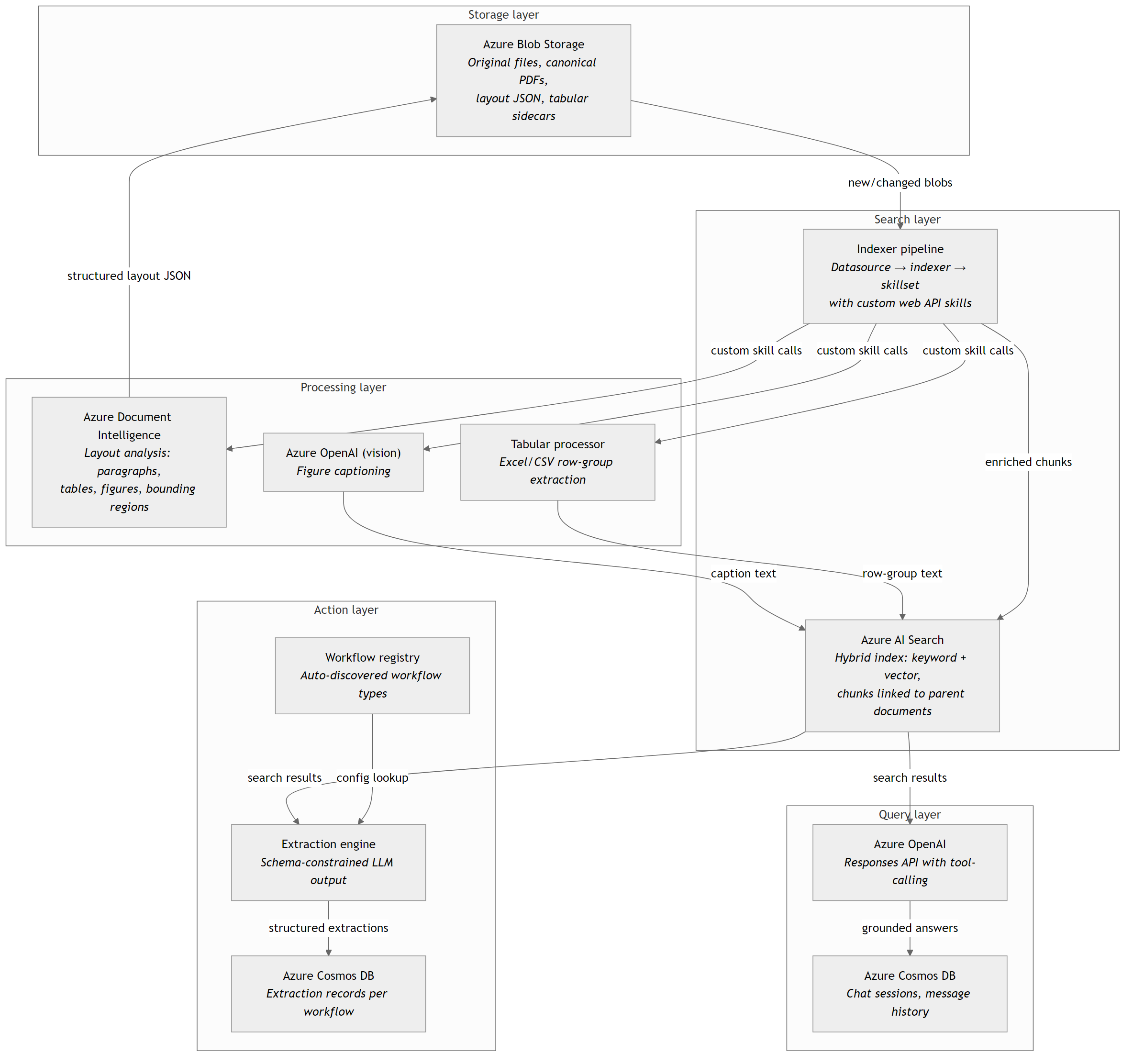
A single document’s journey through these layers looks like this:
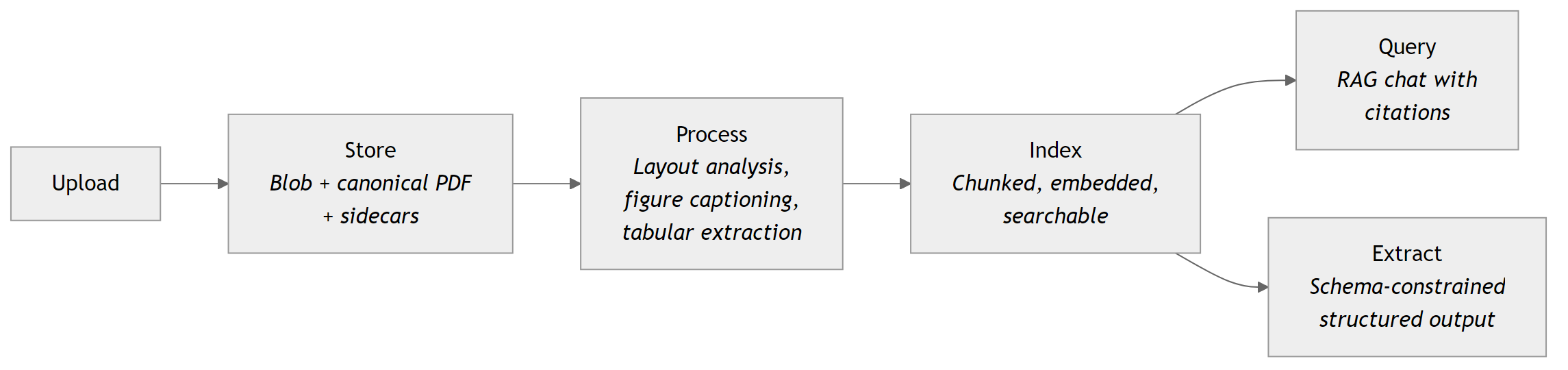
Now let’s walk through each layer one by one.
1. Storage layer: one source of truth
Every document system starts with the same question: “where do the files actually live?” If the answer is “many different places”, nothing downstream will work.
Azure Blob Storage serves as the single source of truth. When a user uploads a file (or blob), the system stores the original, and when needed, a canonical PDF representation (Office documents are converted to PDF automatically via the Microsoft Graph API). As processing continues, derived artifacts (such as layout analysis JSON, tabular row-group sidecars, and extracted figure images) are stored alongside the source blob in dedicated containers. This keeps the original document untouched, while making all intelligence from the derived artifacts accessible to downstream services (i.e. the RAG chat app).
Metadata also matters at this layer. Tags, indexing flags, and custom properties travel with the file and are used in the following steps. A blob marked AzureSearch_Ski: true is invisible to the Azure AI Search indexer pipeline. A blob tagged with document_type: contract can be routed automatically into the contract structured extraction workflow. The storage layer is not just a file dump; it is the operational foundation of the system.
2. Processing layer: teaching AI to read
Layout analysis
If you are just extracting the raw text from your documents (the kind you get from pypdf or basic OCR) and feed that to your downstream applications, the results quickly become unreliable on real-world documents, especially those with poorly structured tables or scanned images saved as PDFs. Tables at best become jumbled text with no proper structure (if captured at all), headers blend into paragraphs, and figures disappear entirely. In practice, this makes the extractions from many documents unreliable for production use.
Figure captioning
For documents that communicate through images (engineering drawings, financial charts, process diagrams, or plain photos), vision-capable models from Azure OpenAI generate captions from extracted figures, charts, tables, or images. Those captions become searchable text, which makes visual content retrievable from the downstream services as normal text.
Azure Document Intelligence addresses this with its prebuilt layout model. It returns structured JSON with pages, paragraphs, tables, and figures, together with positional information such as page number and coordinates (exact location in the document). This allows downstream services to know not only what the text says, but also where it appears in the document. That is especially useful for grounding citations in a RAG application and for highlighting extracted values in the application’s UI.
Excel/ CSV row-group extraction
Tabular content gets its own treatment. Excel workbooks and CSV files are split into meaningful row-groups and stored as structured sidecars. This transforms their shape in a far more usable and optimal form than directly flattening everything into raw text.
Without this step, large table become inefficient to index and difficult to query in downstream applications. Their native spreadsheet structure often expands into bloated text, which increases context size, hence can push requests toward API limits, and reduce response quality.
These processing steps run automatically through the indexer pipeline without human intervention.
3. Search layer: making everything findable
Once processed, document content is stored in an Azure AI Search index, and is retrieved through hybrid search, which combines keyword search with vector search. In practice, this combination consistently outperforms either approach alone, as keyword search catches exact terms, while vector search captures semantic similarity.
In most enterprise environments where the documents corpus is vast, precision can be improved further by applying a semantic ranker. Hybrid retrieval first returns a broader candidate set, after which the semantic ranker reorders the results based on contextual relevance to the user’s query, pushing the most useful chunks to the top before they reach the model. At that stage, the developer can also apply additional filtering to control which results are ultimately passed downstream.
The index follows a parent-child model. One uploaded document becomes many indexed chunks, each linked back to its source document. Each chunk carries its text content, embeddings (a numerical vector that represents the semantic meaning of the chunk), metadata fields, and tags; all of which can be filtered and searched by downstream services.
The indexer pipeline automates this flow. An Azure AI Search data source points to blob storage. An indexer watches for new or changed blobs. A skillset runs the processing layer’s logic during indexing. A file is uploaded, and shortly after, its paragraphs, tables, and figure captions become searchable.
This pipeline is the backbone of the system. Without it, documents remain static files in storage, accessible only to whoever manually searches for them.
4. Query layer: agentic RAG
With documents indexed, users can ask natural-language questions in a RAG chat app and get answers grounded in their stored documents.
The query layer uses Azure OpenAI’s Responses API with a tool-calling architecture for efficient and accurate conversational capabilities, hence not a simple prompt-and-respond loop. The model is an agent, hence given a user’s question, it autonomously decides which tools to invoke and in what order.
It might first call a query rewrite tool to correct typos or transform a vague question into a precise search query with proper format in order to efficiently access the index data and fetch accurate information.
It can then call a document search tool, potentially multiple times, to decompose a complex question into sub-queries that each target different aspects of the knowledge base derived from the previously uploaded documents.
If the answer requires calculation such as summing values from a financial report, or aggregating order quantities from an Excel or CSV file, the model invokes a code interpreter that runs Python in a sandboxed environment. This matters because LLMs are not reliable at arithmetic unless they use code. You have probably already seen this yourself, or at least heard examples of ChatGPT (or similar apps) failing even on fairly simple calculations. A practical way to reduce these errors is to explicitly instruct the model to use code for the calculation, which will typically trigger the code interpreter tool.
As a response to the user’s query, retrieved chunks come back with source metadata (document name, page number, etc.) and because the system uses contextual RAG, each chunk has been pre-annotated during indexing with a summary of where it sits within its parent document, so a paragraph that says “as described in Section 3.2 above” arrives with enough surrounding context for the model to understand what it refers to.
Furthermore, the model synthesizes an answer with inline citations pointing to the exact source locations. When a user asks “what does our contract with Supplier X say about the delivery window and incoterms?”, the system does not guess. It retrieves the relevant clauses, quotes them, and provides a clickable link directing user to exact page number where it is found.
Chat sessions persist in Azure Cosmos DB so users can revisit and continue previous conversations. Conversation history, tool calls, citations, and token usage are all preserved, enabling multi-turn conversations that build on prior context.
5. Action layer: structured extraction at scale
Question answering through an agentic RAG chat is useful, but most organizations need more than just free text answers. They need structured, validated, repeatable outputs that can feed downstream systems and reduce manual data entry.
The same indexed content also powers the extraction engine. When the system needs to extract structured fields from a document such as contract terms, invoice line items, delivery dates etc., it retrieves the relevant chunks and passes them to Azure OpenAI with a schema-constrained tool definition. In other words, it uses structured outputs. The model returns JSON that matches the expected schema instead of free text. And that distinction matters.
“The 15 January 2025 signed contract’s price is 5,000 EUR.” is a chat answer.
{”price”: {”amount”: 5000, “currency”: “EUR”}, “contract_date”: “2025-01-15”} is a structured output that can move directly into an ERP or database.
This capability is implemented through a registry-based workflow model. Each workflow type, such as a contract, invoice, or another document type tied to a business process, defines its own extraction prompt, output schema, and validation rules, while the same generic API endpoints serve all workflow types. Adding a new workflow therefore usually requires only a new configuration folder without any changes to the core system.
The extracted output is then validated against business rules such as date formats and currency formats. Extracted records are persisted in Azure Cosmos DB together with the request and response payloads for traceability and auditability.
This is where the ROI becomes concrete. Not “we have a chatbot” but “we extract and validate structured data from incoming documents consistently and at scale”.
6. The glue: one codebase, one host
All these five layers are served by a single Python codebase running on Azure Functions. HTTP triggers expose document management endpoints, chat endpoints, workflow extraction endpoints, and the custom AI Search skills that power the indexer pipeline.
This is a deliberate architectural choice. A single deployment unit means shared authentication (Azure Easy Auth with role-based access), shared credential management (Managed Identity everywhere), and a unified operational surface. The services are logically separated (document management, chat, extraction), but physically co-hosted.
Azure SignalR provides real-time feedback, pushing indexing status updates to the frontend without polling.
Azure Key Vault secures any secrets and certificates needed for services integrations.
Azure Cosmos DB stores chat history, extraction records, and audit trails.
What comes next
As stated earlier, the purpose of this article is to lay out the architecture of a modern AI-native document management software.
The next articles in this technical series will examine the system layer by layer, starting with storage and moving through processing, search, query, and extraction, with diagrams, code, and implementation details.
Looking forward to it!
Ideas, opinions, and tone are mine. AI helped with the language.
For more articles on AI-native document management visit the pialgorithms blog.
pialgorithms | document management software | ai engineering services