
Building the classification and tagging layer
How one tag vocabulary lives across blob metadata, the search index, and an audit trail, and how smart tagging fills only what people leave blank
This article is the technical pair for Why your documents need consistent tags. The business pair makes the case for treating classification as an owned, ongoing discipline; this one is about how that tagging system is actually built.
It also builds on The architecture of AI-native document management software, and on the published pieces on the document home, search layer, and indexing pipeline.
The easy ninety percent and the hard ten percent
Pointing a language model at a pile of untagged documents and asking it to label them is the easy ninety percent. Any capable LLM will read a contract and tell you it’s a contract. The hard ten percent is everything around that single call, in that the model has to pick from the values your team already uses instead of coining new ones, it must never overwrite a tag a person set on purpose, and months later someone has to be able to answer who applied a given tag and whether it came from a user or a model.
Most of the work sits outside the model call, in how tags get written, where they live in the system, and what stops the model from inventing new values or replacing tags a person already set. Tags are saved as blob metadata in the document home and copied into the search index, where they become the filters the search layer uses. Smart tagging reads a document’s already-indexed chunks (the searchable text segments the indexing pipeline wrote into that index) as its content source, so it never re-opens or re-reads the original file, hence saves time and money.
Where naive tagging breaks
A first implementation usually fails in four ways that have nothing to do with model quality.
The first is free-text metadata with no constraint, so Acme, Acme Corp, and ACME Ltd. all become valid supplier values and no filter can ever gather every document about that supplier. The second is an open-ended model call that returns whatever string it likes, which scales that same inconsistency at machine speed because the model invents a slightly different label on every run. The third is reindexing the whole document on every tag edit (running the full indexing pipeline again), which is slow and expensive when a tag change should touch nothing but a few fields. The fourth is letting the model write over tags that already exist, so a confident machine guess quietly replaces a deliberate user decision and nobody notices until a downstream filter returns the wrong set.
Each of these has a concrete fix in the implementation, and the rest of this article is those fixes.
One vocabulary, three places it lives
The tag categories are defined in configuration. TAG_METADATA_KEYS is the environment variable that lists them (for example document_type, customer, region, product, production_line), and get_tag_metadata_keys() is the helper the application calls to read and cache that list at startup. Adding or renaming a category is a configuration change, so the same generic code serves any taxonomy.
The allowed values are deliberately not hardcoded. They’re collected at run time from the distinct values already present across the user’s documents, which means the vocabulary is whatever people have actually applied so far. People stay in charge of that list, and the model can only pick from values someone has already used on another document, so it spreads existing labels without inventing new ones.
That vocabulary then lives in three places, each with a different job:
- Blob custom metadata is the operational source of truth. Tags are written to the original blob and synced to its canonical copy in the matching
{container}-canonicalcontainer (the document home article explains how that representation is created), so the file itself always carries its own classification. Each category is one metadata key; when a document has several values under that key, they are stored as a single pipe-delimited string (for exampleoil|gas), which the application reads and writes as a list. - Search index fields are the query surface. Each tag category is a filterable
Collection(Edm.String)field on every chunk of the document, which is what makes tag-scoped retrieval possible (the RAG chat service applies those filters on every document search call, and tags such asdocument_typeroute a document to the right extraction workflow). On ingest or a full reindex, the indexing pipeline splits that metadata into those string collections. Later tag edits skip that path and write the collection fields on every matching chunk directly, so the index stays aligned with the blob without re-running the pipeline. - A Cosmos audit record is the history. One record per document holds the current tag snapshot (arrays per category) and a complete change trail, so someone can later answer who labeled a document, when, and whether the value came from a person or from AI; smart-tag runs also keep the model input and output on file when an automated assignment needs to be explained or reviewed.
Tags reach those three places through two REST API calls. When a person sets or edits tags in the UI, the frontend sends a PATCH request to the update-tags endpoint with the new values in request headers, because the person is directly changing metadata on an existing document. When smart tagging runs, the frontend sends a POST request to the smart-tag endpoint instead, because the backend has to run a process first (read the document’s chunks from the search index, call the model, assign zero or more allowed values for each category still blank) before anything gets written.
Both calls do different work up front, then finish with the same three updates. The backend saves tags on the blob (original and canonical copy), updates the matching tag fields on every indexed chunk, and records the change in Cosmos. That shared landing is why the UI, search filters, and audit trail always show one consistent classification whether a user or the model applied the tag.
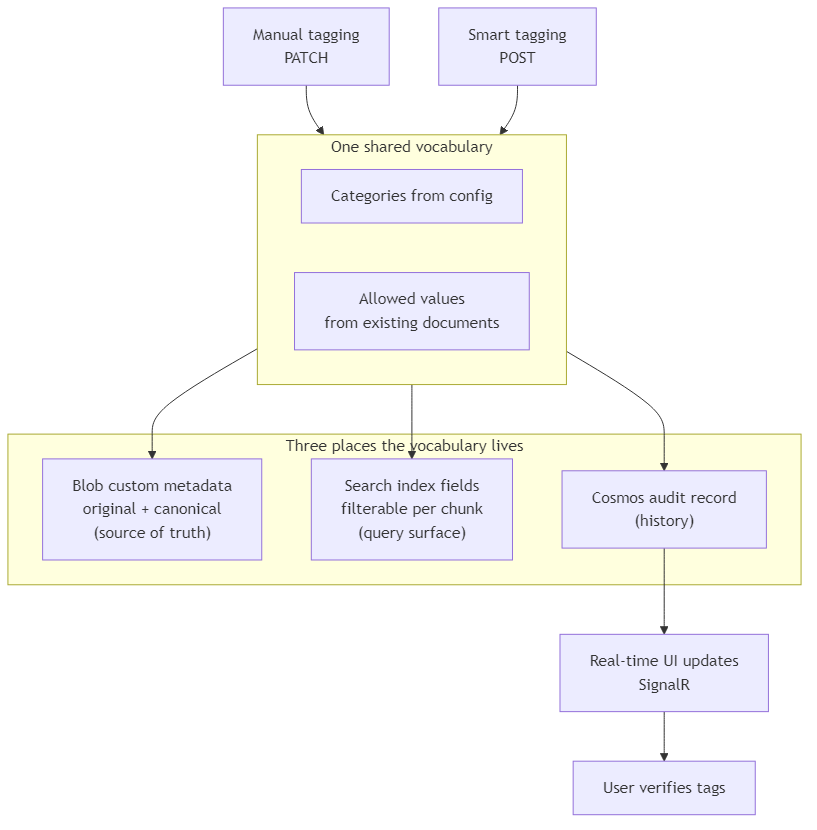
After the three writes complete, the backend pushes real-time SignalR events to the document’s container (the document library it belongs to) so connected clients refresh without polling. Both the manual PATCH and smart-tag POST paths use the same three event names, even though the name suggests smart tagging only. smartTagStarted fires when a tag update begins, so the UI can show that work is in progress. tagsChanged fires when new tag values were written successfully, so the UI can reload the document row and surface AI-assigned tags for verification. smartTagCompleted fires when the operation ends, success or failure, so the UI can clear the in-progress state.
Inside the smart-tagging engine
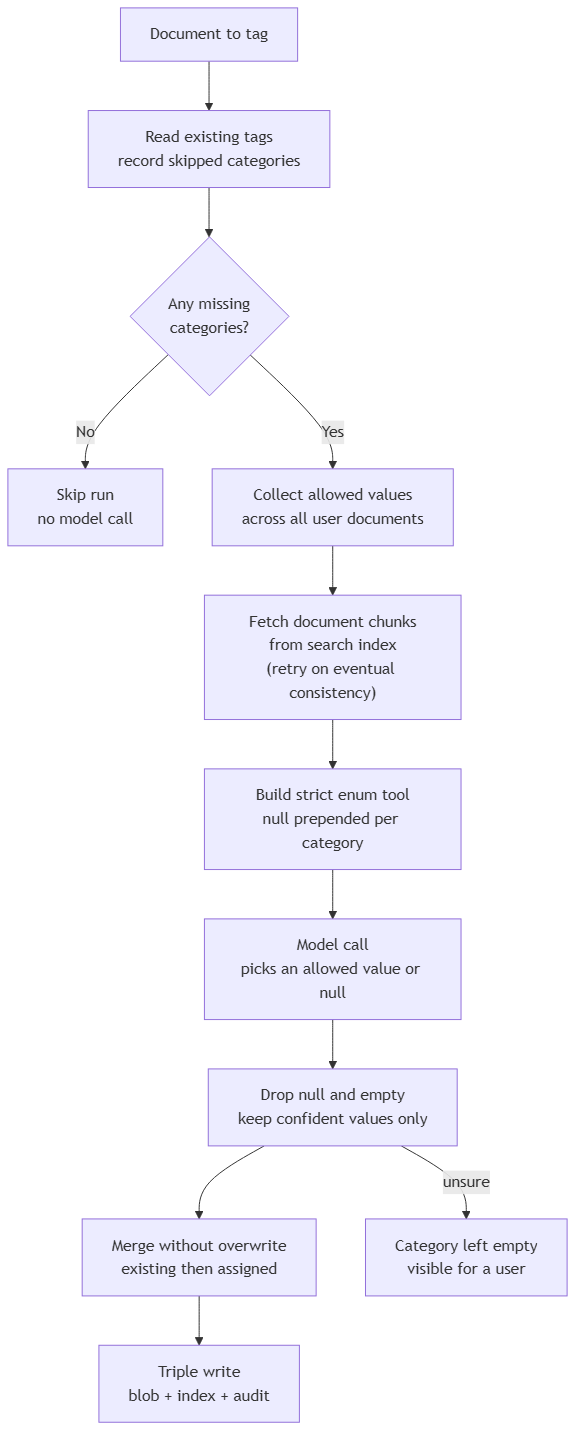
The smart-tag engine runs a fixed sequence, and every step exists to enforce one of the safeguards above. The flow below matches the diagram at the end of this section.
Document to tag. A run starts when someone triggers smart tagging on one file in one container (the document library the file belongs to). The engine receives the file name and container; everything else it needs it loads from storage, the search index, and configuration.
Read existing tags and compute residual candidates. The engine reads the document’s current tags from blob metadata, then gathers the closed vocabulary of distinct atomic values people have already applied on other documents the user can access (a multi-value tag contributes each value separately). It subtracts values the document already has. What remains is the residual menu for this run: the fixed options the model may choose from, with no inventing a label nobody has used before. Existing values stay on the document; the model is never asked to replace them.
Any residual candidates? If every configured category already covers its full vocabulary (or has no corpus values yet), the run stops here with no model call.
Fetch document chunks from the search index. The engine assembles the document’s text from its indexed chunks (the same searchable segments the indexing pipeline wrote at upload time), rather than reopening the original file from blob storage.
Build a strict multi-value enum tool for each residual category. Before the model call, the engine builds a structured tool schema where each category with leftover options accepts zero or more values from that residual list, or null/empty when nothing fits. A few categories get extra plain-language instructions in the tool description; for region, the model is told to tag the other party’s region, not the home company’s (the company the user belongs to).
Model call. The model reads the assembled chunk text plus the residual allowed-value lists and returns, for each category, every remaining option that clearly applies (or nothing when uncertain).
Drop null and empty values. The engine discards null, empty lists, and any items outside the residual vocabulary, then keeps only confident new assignments.
Category left empty, visible for a user. When the model returns null or an empty list for a category that had no prior values, that field stays blank on the document. The UI shows the gap so the user can set the tag by hand instead of storing a machine guess.
Union merge without overwrite. Confident new values are unioned with tags already on the document. A value a person set earlier is never dropped; the machine may only append additional vocabulary matches.
Triple write. Same three writes as the manual path, with model input and output kept on the audit record for this run.
The partial index update
Propagating a tag change to the index is where the reindex trap gets avoided. Instead of re-running the indexing pipeline, the platform queries the search index for every chunk of the document by title and container, paginating through results so even large documents are fully covered, and then issues a single batch where each chunk uses the mergeOrUpload action (Azure AI Search’s way to update only the fields you send, without replacing the whole chunk) to set each tag field to its new value or to null when a tag was removed. The container field is treated as immutable, since it’s set once at upload time.
The platform treats these as two different jobs. When a document’s content changes, the indexing pipeline reprocesses the file and rebuilds its chunks. When only tags change, the platform patches those tag fields directly in the search index and does not rerun that pipeline. The API response includes indexer_triggered: false, a flag that tells the UI no full document reprocessing was started.
Smart-tag runs also keep the model input and output on that document’s Cosmos audit record, so someone can later review what the model saw and what it assigned. Over time that builds a history of every tag state the document went through, which is what lets the organization answer accountability questions after the fact.
Reality check
The biggest constraint is the cold start. Because the model can only pick from values that already exist, a brand-new category with no user-applied values gives it nothing to choose from, and smart tagging will correctly assign nothing. Someone has to tag at least one document by hand first, which is the technical reason the manual path is the foundation the whole engine depends on.
There’s an honest limit on sensitive categories too. The engine doesn’t enforce a per-category “users only” lock; it fills any configured category that’s missing a value. The safety for confidentiality levels or legal-hold status comes from three things working together, in that the model only fills gaps, it returns null when unsure, and every value it sets is attributed to it in the audit trail. The operational practice that makes this safe is to apply sensitive categories by hand, so they’re never in the missing set the model is allowed to touch.
Cost is bounded but real. Smart tagging is one model call per document, run on demand rather than on every upload, with prompt caching on the static instruction prefix and store=False (so the model provider does not retain the request on their servers).
Conclusion
A classification layer that holds up is built around one decision, in that the vocabulary is a shared contract that users own and the model only extends. Everything else follows from it. Categories live in configuration so the same code serves any taxonomy, allowed values are collected from what people have already applied so the model can’t invent labels, the model can only pick from that fixed menu or leave a category blank when unsure, and new machine-assigned tags are added without replacing tags a person already set.
The three places divide the work cleanly, with blob metadata as the source of truth, the search index as the filter surface kept current by the partial index update above, and the Cosmos audit record as the history that explains every change. Manual and smart tagging are two entry points into that one system, which is what turns a pile of stored files into a collection you can actually filter, search, and act on.
Ideas, opinions, and tone are mine. AI helped with the language.
For more articles on AI-native document management visit the pialgorithms blog.
pialgorithms | document management software | ai engineering services