
When the AI answer doesn’t match the file on screen
Ask about a Word or Excel file and the price or clause can come back different from the preview and from the file someone has open. Give the AI, the preview, and search one PDF to share, and keep the original as the download.
A rate card, three readings
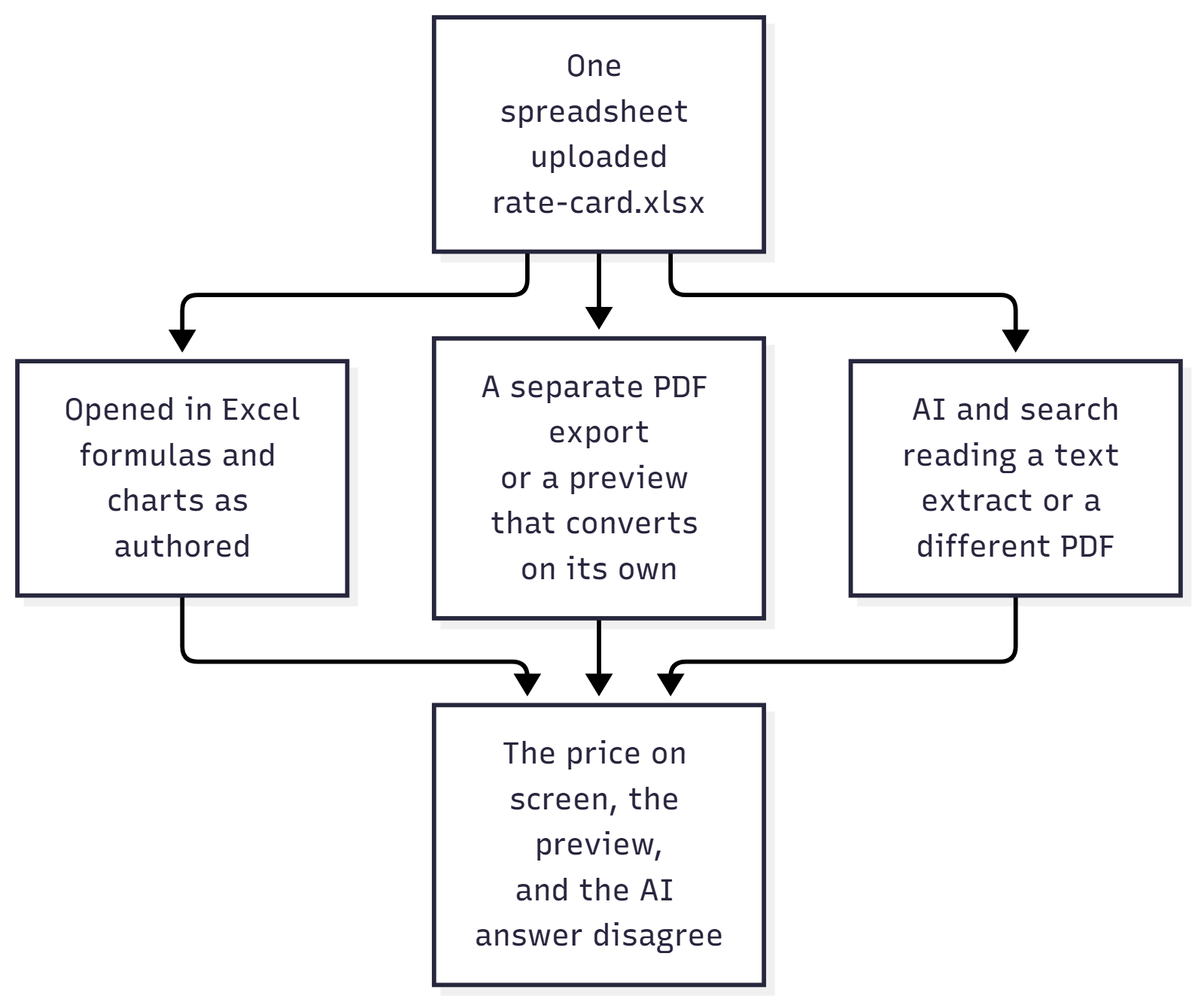
Finance uploads the new rate card, an Excel file, and pings the thread that it’s up. A colleague asks the AI for the unit price on the standard SKU. The answer names that spreadsheet and gives a number. The colleague opens the file on screen, and the cell shows a different number, or the chart that explains the discount is sitting there and the answer never mentioned it. Someone else opens preview and sees the page break in yet another place. The meeting turns into “the AI is wrong” against “you still have last quarter’s file open.”
Both sides can be holding a real file. The number can be wrong even when the model only wrote what it was given, because preview, search, and the AI answer were each allowed to open that spreadsheet in their own way. Any product that answers questions about Word and Excel has this exposure the day the library stops being a folder of tidy PDFs, and an AI answer about a document stays only as aligned as the copy each part of the product was allowed to read.
Where this sits
Where should your documents live and the document home already keep an original file and a second copy for reading, and a good AI answer has to open on a real page. This piece is what that second copy has to be so the file on screen, preview, search, and the AI answer share the same pages, which is separate from the wait in a file in the document home isn’t always ready to work with; the architecture overview only names the copy.
Why the file on screen and the AI answer diverge
The common trap is a product that feels like one system because the screen shows one filename. Behind the name, preview asks the browser or a live Office view to draw the Word file, search pulled the text out with a different tool, and the AI answer is written from whatever search returned. The person comparing the answer to the file on screen is comparing three readings of one upload. Word’s page 4 and a text extract’s page 4 aren’t a stable place to point, which is why a highlight on the source needs one set of pages with a shape everyone shares.
The second trap is a PDF someone exported last quarter, while the workbook kept moving. Chat quotes the export while the file on screen is the workbook the team edited on Tuesday, and the answer can even show the right filename, which makes the mismatch harder to see because the name matches and the pages don’t.
The third trap is converting on every open. Preview builds a fresh rendering in the viewer, and the overnight job that feeds search builds another one with a second engine. Tuesday’s preview and Wednesday’s AI answer are two exports wearing one name.
The fourth trap solves the mismatch by throwing the original away. The library keeps only a PDF, and operations can no longer send the workbook a supplier asked for, or edit the rate card in the tool that created it. The readings now agree, and the team has lost the file they actually work in.
The fifth trap is the promise that the AI reads everything you upload. A zip, a drawing, or a contract that exists only as an attachment inside an email can still sit in the folder. The AI then says it doesn’t know, or it answers from a neighboring document with the same confidence it uses when it’s right. A business hears “we checked that file,” when the file was stored without ever being given a set of pages the AI answer could read.
One shared PDF for preview, search, and the AI
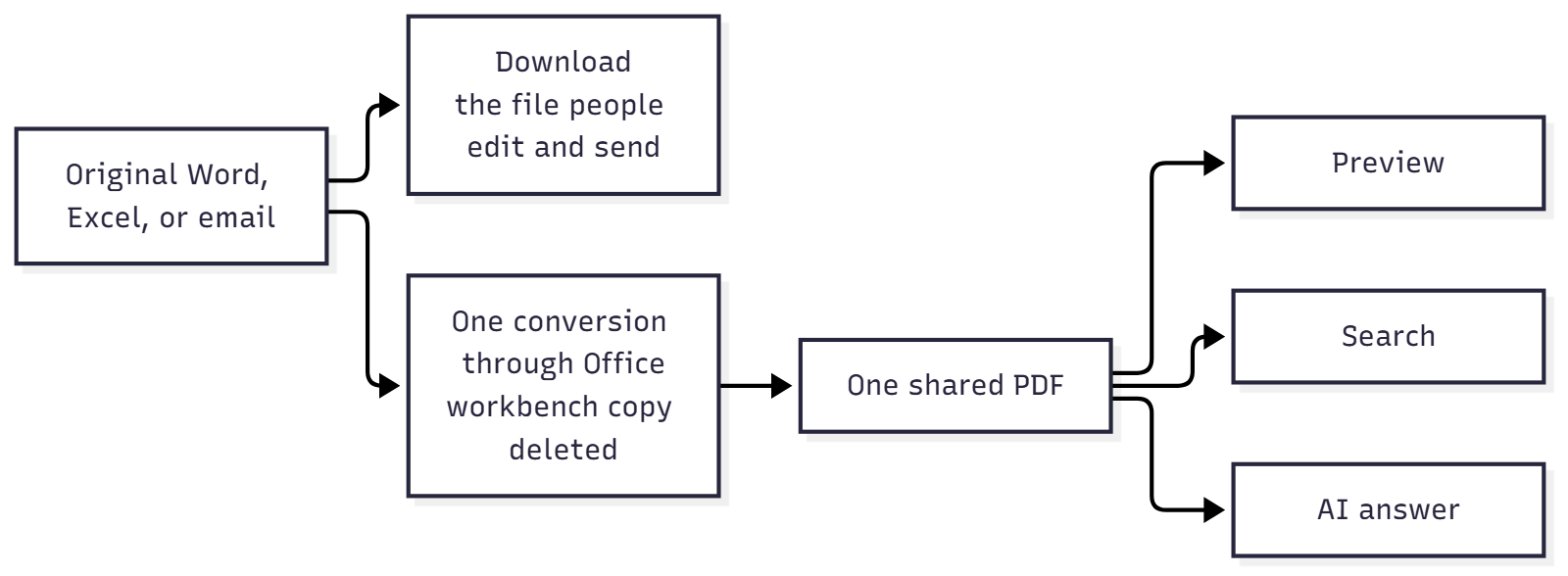
Call the pages that preview, search, and the AI answer are allowed to read the shared PDF. The document home stores that PDF beside the original and calls it the canonical copy. The business rule is plainer than the storage layout. Produce those pages once, keep them, and make every reader use them. Leave the original as the file people download, edit, and send.
Three kinds of file follow from that rule.
Already a page. A PDF, or a photo or a scan. That file is the shared copy. Preview shows it. Search and the AI answer read it. Download gives the same file back, because there was nothing to convert.
Office, text, and email. Word, Excel, PowerPoint, the older Office formats, the same kinds of files from other office tools, CSV, plain text, web pages, Markdown, and email. People still need the original, so download returns that file untouched. One conversion, done by Microsoft Graph through the Office stack that already knows how to open these files, produces the shared PDF. The file is copied to a SharePoint site used only as a workbench, under a throwaway name, and that temporary file is deleted once the PDF is stored, so the contract isn’t kept there under its real name. Preview opens the PDF. The indexing pipeline reads that same PDF, which is what search and the AI answer are built from. The answer names the original file, the spreadsheet or the Word document people recognize, and the pages behind that name are the shared PDF. For a spreadsheet, the row-by-row reading search uses is taken from the same copy that became the PDF, so a price in the answer and a price on the preview page come from one place. A later extract that highlights a value on the page is pointing at that same PDF, which is what makes the highlight land where the person is looking.
Stored, and unread. Anything outside that set can still live in the document home. Preview is refused. Search never picks it up. The AI hasn’t read it. The honest outcome is a file you can download, with no pretense that a question about it was checked against its contents.
The file on screen inside preview is the shared PDF. The file on screen inside Excel, after a download, can still be the workbook. Those are two different checks, and the rest of this piece keeps them apart.
What to require, and how this system does it
If you are buying or building an AI document product, the check is whether preview, search, and the AI answer were given the same pages. When each feature opens Word or Excel on its own, the answer and the file on screen will drift, and you should require one shared PDF, produced once, with all three pointed at it. When the only file you can get back is that PDF, the product has thrown away the workbook operations still has to send. Require the original as the download. When a file type can’t become those pages, require the product to keep the file and to stop implying it was read.
These are the checks I hold this document system to.
If the upload is already a PDF or an image, it is stored as the shared copy. That path skips Office.
If the upload is Word, Excel, PowerPoint, or one of the other types in that second group, the shared PDF is produced before preview or the indexing pipeline is allowed to treat the file as current. A CSV is laid out as a workbook first, and a plain text file as a simple Word document, because the converter speaks Office. A standard saved email is turned into a reading copy of the message first. The message text is there, attachment names are written in, the attached files aren’t opened, and pictures linked from the internet aren’t fetched. An Outlook message file is handed to the same Office conversion as itself. In both cases download returns the original email. A contract that exists only as an attachment isn’t in the library until someone stores that contract as its own document.
If that converter isn’t available, an upload that needs it is refused, new file or replacement, and the library is left as it was. The list doesn’t gain a Word file that looks ready for the AI to read.
If this one file fails to convert, the original can still be downloaded, preview says preparation failed, and there is no shared PDF for search or the AI answer to read.
If someone replaces a file, the new bytes stay off to the side until the new PDF is ready. Preview and download keep serving the version already in the library. When the new PDF is saved as the current version, it becomes the file people see and the file they download. If the new conversion fails, they stay on the version that already worked.
Some workbooks won’t turn into a clean PDF. When a workbook needs a cleanup before Office will accept it, formula results already saved in the file are written in as plain values, so the PDF doesn’t wait on Excel to recalculate them later. If that cleanup can’t find those saved results, conversion stops, and no number is filled in. A chart that blocks the export can be left out of the PDF so the rest of the workbook still converts. The workbook you download still has the chart. Search reads the rows from that same cleaned copy, so the price in the AI answer and the price on the preview page come from one workbook. They can still differ from the workbook open on a desktop, which is why download exists.
A new file can show its name in the list while the shared copy is still being finished, and preview says it is still being prepared. Upload leaves the indexing pipeline to its own run, so the AI answer isn’t quoting the new pages in that window. That wait is the subject of a file in the document home isn’t always ready to work with. It’s a different problem from three finished readings of the same file.
Preview is sent with an instruction that the browser shouldn’t store the stream, so a cached tab can’t sit beside the PDF in the document home as a second copy.
What that PDF won’t promise you
The shared PDF is a reading copy. Office’s own export can break a page in a different place than the Word window on a desktop, and a chart can be missing from the PDF while it’s still in the workbook. Closing the gap between preview, search, and the AI answer means those three agree with each other. A person who needs the chart, or the exact workbook a supplier expects, downloads the original and works from that.
The conversion depends on Microsoft’s Office renderer, called through Graph. A lookalike engine would be a fourth reading of the same contract. When that path is down, Office files are refused up front, or a single file fails preparation. Either way, the AI isn’t handed pages that were never made. Every Office, text, and email file pays for that conversion once, and reusing the stored PDF costs less than converting again in the viewer and again for search, which still leaves the readings free to disagree.
A library full of file types that can’t become pages will look like an AI that misses things. The miss is the format. Those files stay in the document home, they stay out of preview and out of search, and download is how someone still gets the bytes.
The people who own the rate card still own the workbook. This rule leaves their editing process with them. It stops the AI answer from becoming a second, unofficial rate card that happens to carry the right filename.
Conclusion
An AI answer about a Word or Excel file is checkable when preview, search, and the answer were all taken from the same pages. Those pages have to be produced once, stored, and reused, and in this document system they are a PDF made by Office itself. Preview opens that PDF. Search and the AI answer read it. Download remains the original file, because people still edit the contract in Word and still send the workbook. A product that converts in three places, or that draws the Word file in the viewer while the AI answer read something else, will keep producing answers that don’t match the file on screen. A file that never became pages was stored, and it wasn’t read.
The technical pair for this piece is Building the Office to PDF conversion that preview and search share.
Ideas, opinions, and tone are mine. AI helped with the language.
For more articles on AI-native document management visit the pialgorithms blog.
pialgorithms | document management software | ai engineering services