
Easy Auth and the check that decides which library opens
A company login becomes a person and a library list, and every document request checks that list before a file opens.
This article is the technical pair for Who can open which documents. The business pair makes the case for checking the library on every request; this one is about the technical implementation.
It also builds on Zero secrets in code: managed identity for service-to-service auth, where the sign-in token already carries group ids, and on The architecture of AI-native document management software.
A request can name a library the menu never shows
A person on the legal team can name the finance library on a request the screen never offered, and Easy Auth only established who they are, so the Function still has to decide whether that name is on their library list before a file opens. The menu is painted from the library list the server already returned, and the request can still name any library in the document home, because the app that reads those files already has its own sign-in, with permission to read the storage account. Who can open which documents is the case for running that check on every request. This article is the construction of the check.
Easy Auth here is Azure Static Web Apps built-in authentication, the platform login in front of Azure Functions. A signed-in session is what lets the browser reach the API, and the Function still refuses the call when it can’t read a person on the request.
The person’s login sits in front of the app’s login
Zero secrets in code: managed identity for service-to-service auth is the app’s sign-in, the credential that reaches the document home, search, and the other Azure services after a person has been allowed in. Who can open which documents is the person’s side. Directory groups open shared libraries, and the person id opens a personal library. The architecture overview named the front door. This piece is the two moments behind it.
Sign-in turns group ids into role names. Each later request turns those role names into libraries, adds the personal library, and allows the name the caller asked for only when it is already on that list.
Where a company login gets treated as the whole access model
The common trap is the platform role authenticated. Anyone who can sign in has it, and it is what lets the browser reach the API. If that role is also a key to every library, legal, a contractor, and last month’s leaver all open finance.
The second trap is hiding the finance row in the menu. The library-list call returns only libraries this person may open, and the screen renders that payload, with the personal library labeled as their own files. A caller who never opens the screen can still send the finance name. When the Function accepts that name, the hidden row changed the picture and left the files where they were.
The third trap is a second membership list, kept inside the document system or rebuilt with a directory query on every login. Group administration already lives in Microsoft Entra External ID. The role step reads group object ids from the sign-in claims and matches them to roles in configuration. It doesn’t call Microsoft Graph for membership, so the next login reads the group ids on the new token.
The fourth trap is filling in libraries when the group list comes back incomplete. Entra omits the group ids when the person belongs to more groups than the token can carry, and it marks that gap. The role step treats the mark as a reason to add no shared-library roles from groups. The personal library still opens, because it follows the person id. Granting extra libraries so a demo looks full is how a missing answer becomes access to the wrong files.
The fifth trap is reading the person id from a header the browser sets. The Function takes the id from the client principal attached after login. Chat history is stored under that same id, so a chat id on the request is read only inside this person’s records.
The sixth trap is folding the personal library and a shared library into one grant. Shared libraries come from roles, and the personal library is named from the person id, including when that person has no group roles. Fold those together and a new hire either sees someone else’s private files or loses the shared work the team uses.
Easy Auth assigns the library list at sign-in
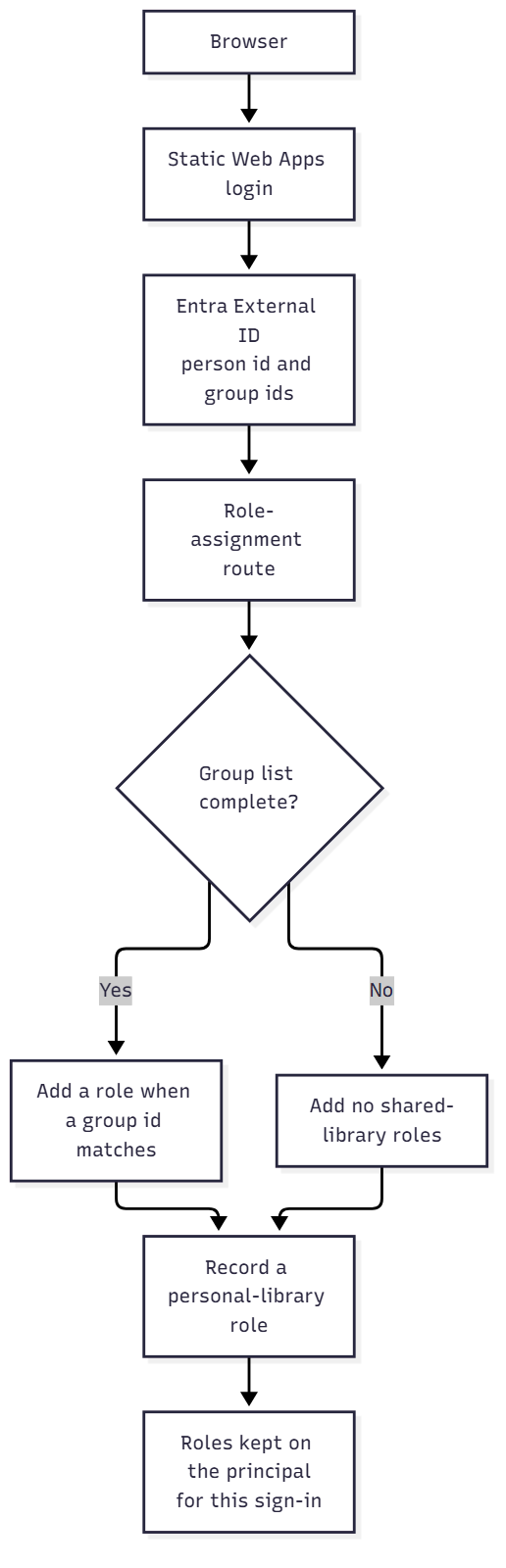
The browser signs in through the platform login, which redirects to Entra External ID. The provider asks for the openid, profile, and email scopes. The client id and the client secret are setting names, and the config file holds those names without holding the secret. That secret, and the job that renews it, are the certificate path in Zero secrets in code: managed identity for service-to-service auth.
After a successful login, Static Web Apps calls the role-assignment route configured as its roles source, POST /api/GetRoles. The call carries the sign-in claims in the body and the platform principal on the request. That route is reachable during login, while pages and the rest of the API still require a signed-in person. An unsigned page load is sent to the login route.
The route loads a map from role name to directory group object ids. Group ids are taken from the groups claim, and only when the value is a GUID, so a display name in that claim adds nothing. If the body’s person id doesn’t match the principal’s person id, the body is dropped, and a payload that names someone else can’t attach their groups to this login.
When the claims say the group list was truncated, through a hasgroups claim or a _claim_names entry that mentions groups, no shared role is added from groups. Access token claims are where that truncation shows up. When the list is complete, a role is added when the person’s group ids overlap the group ids configured for that role. A group id that appears under no role adds no shared library.
If the login has a person id, the route also records a personal-library role. That role is a marker on the sign-in. It isn’t an entry in the library map, and it doesn’t name a shared container. anonymous and authenticated are removed before the list is returned, so the platform’s own marks can’t be looked up as libraries.
The response is a JSON list of role names. Static Web Apps keeps those names on the client principal for the rest of the sign-in, and later requests read the stored roles.
The request checks that list before a library opens
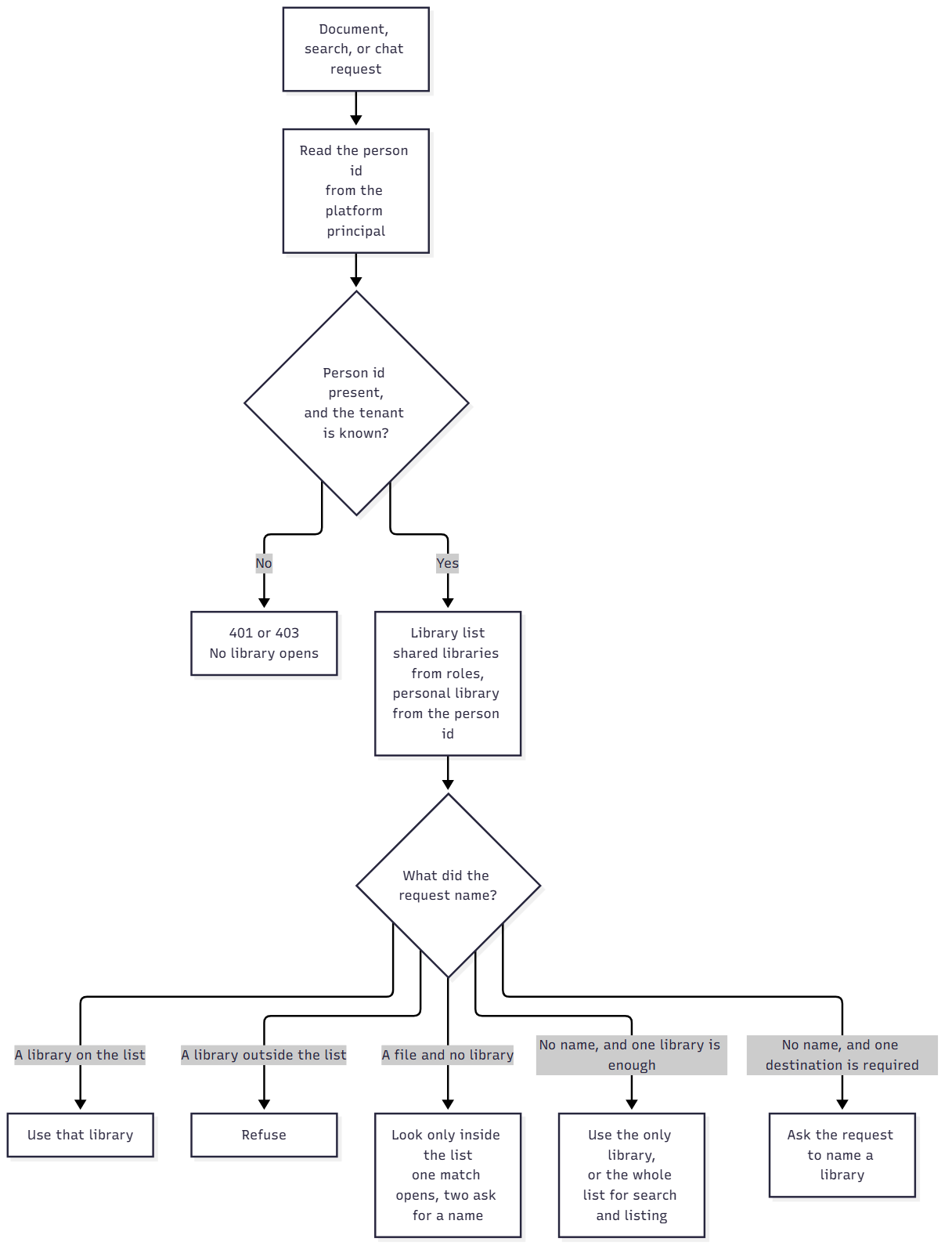
Upload, download and preview, delete, tagging, extraction, the library list, and chat all start by reading the client principal. The header is base64-encoded JSON. The Function decodes it and takes the person id from the directory object id when the claims include one, and otherwise from the user id on the principal when that value is a GUID.
If there is no person, or the tenant is unknown, stop
No principal, or a person id that isn’t usable, returns 401, and no library is considered.
The tenant id on the principal has to match a known customer row. When the platform omits claims on an API call, the tenant configured for this deployment is used instead, and it still has to match that row. An unknown tenant, or an issuer that doesn’t belong to the tenant, returns 403 before any library opens. A client id supplied on the request is ignored. Which services that customer row turns on is a later article. This check only answers whether the sign-in tenant is one this deployment will serve.
If a role has no library, it opens nothing
A second map, role name to library name, is how shared libraries are chosen. The same role name is the key in both maps, so one grant runs from a directory group to a container in the document home.
{ "finance": ["11111111-1111-1111-1111-111111111111"] }{ "finance": "finance" }The first object is the sign-in map, a role pointing at directory group ids. The second is the request map, that same role pointing at a library name. A role with no library entry grants nothing, and if the library map can’t be loaded the shared set is empty for that request. anonymous, authenticated, and the personal-library role are expected to have no library entry, so they don’t count as a broken map.
The personal library follows the person id
On every request that has a person id, the system builds a library name from that id and adds it to the allowed set. The name is my-files- plus the id in lowercase, the personal container the document home already uses. Another person’s groups don’t put files there.
When a request needs the libraries that actually exist, including the menu, the document list, and the live channel, a personal library that isn’t there yet is created together with its canonical container and then included, so a person with no shared roles still has this one library. Shared libraries that already exist stay on that list, and a role whose library hasn’t been created yet is left off it.
If the request names a library, allow it only when it is on the list
Document calls send the library in the x-container header, the container the caller wants. Download and preview send the same name as a query parameter. The value is trimmed and compared in lowercase to the allowed set. A name on the list is the library the call uses, and a name outside the list is refused. An empty allowed set is refused before any name is considered.
requested = (header or "").strip().lower()
allowed = {name.lower() for name in allowed_libraries}
if not allowed:
    return 403
if requested and requested not in allowed:
    return 403
if requested:
    return requested
if len(allowed) == 1:
    return next(iter(allowed))
return 400
That last branch is the path that needs one destination. With a single library, the name can be omitted and that library is used. With several, upload doesn’t hunt for an existing file to pick a home, because a new file has nowhere to land until the caller names a library, so the request has to send x-container. Listing documents may keep the whole set when no library was named, and each file comes back with the library it lives in. Naming one library on the list returns only that library’s files.
If the request names a file and no library, look only inside the list
Download and preview, delete, tagging, and extraction look for the file name inside the allowed libraries only. No match returns not found, one match uses that library, and two matches ask the caller to name which one. The lookup never walks a library this person may not open, so a second copy of the file in legal doesn’t make legal a candidate for someone whose list is finance plus their own files.
Search and chat stay inside the same list
Chat retrieval builds the container filter the search layer already applies. Libraries the person picked are kept only when they sit on the allowed list. When that intersection is empty, search doesn’t run. When they picked none, the filter is every library on the list. A chat request that names a library outside the list is refused before the model runs. The live channel joins the person only to groups for libraries on the same list.
Reality check
Someone other than the team that built the screen has to own which group id sits on which role, and which role names which library. A finance role pointed at the legal container won’t show up in a demo where every tester can already open everything. Prove the setup with a person who should see finance and nothing else, then send a request that names a library they shouldn’t see. The second request has to be refused while the first screen still looks right.
The library list is fixed when the person signs in. Static Web Apps calls the role route on a successful login and keeps the returned roles on the principal. An open session keeps that list, directory edits included. The screen signs the person out after 15 minutes without activity, and after 12 hours in any case, and the next login is what asks for roles again.
Roles the principal already carried are kept when the group list is incomplete. Whenever the request has a person id, the personal library is added from that id, including when the role route returned no shared roles. If the role route throws, it still answers with an empty role list and a success status, so login can finish and the shared libraries stay closed.
The personal library gets a canonical copy, goes through the indexing pipeline, and can be found in the search layer. It’s a poor place for the team’s shared contracts, because those files then exist for one person.
The Function decodes the client principal and doesn’t check a signature. The browser calls /api on the Static Web App, which is what attaches that principal after login. A deployment that lets callers reach the Function on its own hostname would be trusting a header those callers can set, so that hostname stays behind the Static Web App.
The indexing pipeline calls its own routes for layout, figures, and captions. Those calls aren’t a person’s request, so they don’t run this library check.
When the claims are missing, a GUID user id on the principal is still accepted, and the local emulator can use its own non-GUID user id so a developer can exercise the check. Hosted login carries the directory object id.
Conclusion
Who can open which documents comes down to three answers, produced at two times. Easy Auth, through Static Web Apps and Entra External ID, says who the person is, and the role route says which shared roles their groups earn. Each request builds the library list from those roles plus a personal library named from the person id, then allows a library only when that name is already on the list. Upload, download, tagging, extraction, search, and chat all use that list. The menu is a view of the same list. The app’s sign-in from Zero secrets in code: managed identity for service-to-service auth is how the Function reaches the document home after the check has passed, and the check is what keeps that reach inside the libraries this person may open.
Ideas, opinions, and tone are mine. AI helped with the language.
For more articles on AI-native document management visit the pialgorithms blog.
pialgorithms | document management software | ai engineering services