
Zero secrets in code: managed identity for service-to-service auth
The app signs in with one Azure credential, and settings hold account names and endpoints, with one certificate left for the tenant that credential can’t reach.
This article is the technical pair for Passwords in app settings are a security risk. The business pair makes the case for signing the app in as itself; this one is about the technical implementation.
It also builds on The architecture of AI-native document management software.
A storage key in settings is still a login
Someone stands up a second environment, and the portal’s shortest path is a storage connection string. Paste that string into app settings and the new environment can read the files production reads. The string is a login to the document home, and anyone who can open the setting, a pipeline log, or an old ticket can take a copy. Managed identity is the sign-in that replaces that key for the app’s own calls. The running system has an identity in the directory, each Azure service grants that identity the operations the app actually performs, and those calls never read a storage key, a search admin key, a model key, or a key for the live status channel.
Passwords in app settings are a security risk is the case for that choice, and this article is the construction of the credential object, the clients that receive it, and the one call that still presents a certificate.
The app still has to reach Azure after the person is allowed in
Giving your documents a proper home already keeps the browser off the storage account. Download and preview stream through the Function, and the person’s library check runs on the request. After that check passes, the Function still has to read and write blobs, query the search layer, run the indexer, keep chat history and extraction records, read layout, and call the model. The architecture overview named one shared sign-in for those calls, and this piece is how that sign-in is built, while which person may open which library stays a later article.
Where a key inside the client goes wrong
The common trap is the SDK quickstart. The sample builds a blob client from a connection string, the setting survives the demo, and every environment that can read app settings can read the account. An endpoint URL is configuration, while an account key is a login.
The second trap is a key with no boundary. The document home spends real effort deciding which containers a person may open. A storage account key doesn’t carry that boundary, so holding the string is enough to read every container in the account.
The third trap is moving the same key into a vault and treating the move as the fix. The app can still read the secret, a script can still read the secret, and rotation still means finding every copy taken while the secret was readable. Azure Key Vault is the right place for a certificate the app can’t avoid, and it can keep that certificate’s private key from ever leaving the vault, while a storage key kept there is still a password.
The quieter trap is a laptop that hides a missing grant. A developer who is already signed in with rights over the subscription will succeed at calls the Function App’s identity would be denied, so the path looks proven while the identity production will use was never the one that ran.
Managed identity is the credential each client receives
The data-plane clients don’t read a key. Each subsystem builds a DefaultAzureCredential and hands it to the Azure SDK. The call sets no custom chain and no client id. On Azure Functions, that object can take a token from the managed identity the platform exposes to the app. On a developer machine the same call continues through credentials already present, including an Azure CLI login, so local work doesn’t need a production key in a file. Office conversion on that machine uses a separate sign-in, described with the Graph call.
There isn’t one process-wide credential object. Blob storage, the search query path, the indexer, chat history, indexing audit, extraction records, layout reading, the live status channel, and hosted Office-to-PDF conversion for canonical renditions each keep their own instance, created on first use and reused after that, and every one of those instances is the same kind of sign-in. On the hosted app a token from any of them is the app’s identity, and on a laptop it is the developer already signed in to Azure, so splitting the objects doesn’t split the permission.
Settings hold names and addresses:
- the storage account name
- the search endpoint and index name
- the Cosmos account, database, and container names for chat, for the audit trail on tags and indexing side effects, and for extraction records
- the model endpoint and deployment name
The credential is what those clients present. Blob storage shows the shape the others follow, and this client is what reads originals, canonical renditions, and sidecars. The account URL is built from the account name, and BlobServiceClient receives that URL plus the credential. There’s no connection-string fallback on this path, so if the account name is missing, storage doesn’t start.
account_url = f"https://{account_name}.blob.core.windows.net"
blob_client = BlobServiceClient(account_url, credential=DefaultAzureCredential())
Azure OpenAI and Document Intelligence share a different shape of the same sign-in. Neither client takes the credential object as its login argument, and both ask the credential for a bearer token scoped to https://cognitiveservices.azure.com/.default. Chat, figure captions, and per-chunk context share one token provider, even when they target different endpoints and deployment names. Those names stay in settings, and a model key doesn’t. The same credential type is also what the search query, the indexer, the Cosmos clients, the conversion queue, and the live status channel present, and on the hosted app it’s what calls Microsoft Graph when an Office file needs a canonical rendition.

Which call gets the credential
If the service accepts the app’s identity, pass the credential
The search query client is a SearchClient built with the search endpoint, the index name, and the credential. The endpoint and the index name are required, the client doesn’t read an admin key, and the same worker reuses that client after the first request.
The indexer uses a SearchIndexerClient on that same endpoint when the app checks whether a run is in progress or starts one. The credential in that module is cached, and a new indexer client is built for the check or the run, still with that credential, because those calls happen when work needs them, not at process start.
Chat history, the audit records for tags and for indexing side effects, and extraction records each construct a CosmosClient against https://{account}.documents.azure.com:443/ with the credential. Separate clients match separate sets of records, the sign-in is the same, and each client is kept for the life of the worker.
The conversion queue follows the blob account when it is aimed at Azure. A QueueClient takes the queue endpoint, from a setting or derived from the storage account name, plus the credential. If a local emulator connection string is present, that string is used instead, and the queue is created when it isn’t already there. The emulator string stays on the laptop, where it isn’t the password production uses for Blob Storage, and the blob client never consults it.
The model path uses get_bearer_token_provider. The OpenAI SDK still names the argument api_key, and the value is the provider, a function that fetches a token for the Cognitive Services scope, so the field that quickstarts fill with a model key holds a sign-in instead.
token_provider = get_bearer_token_provider(
    DefaultAzureCredential(),
    "https://cognitiveservices.azure.com/.default",
)
model_client = OpenAI(
    base_url=f"{endpoint.rstrip('/')}/openai/v1/",
    api_key=token_provider,
)
Document Intelligence is a REST call, so the same scope is requested directly and placed on the request. Layout reading during indexing uses that header. It doesn’t carry a key from settings.
token = credential.get_token("https://cognitiveservices.azure.com/.default").token
headers = {"Authorization": f"Bearer {token}"}
If the call is the live status channel, let the service issue the client token
Real-time document status reaches SignalR through its REST API, and every server call carries a bearer token for the https://signalr.azure.com/.default scope, taken from the same credential. Adding a person to the group for each library they may open and sending a status event to that group both work this way. The browser still needs its own token to open the socket, so negotiate asks the service’s token endpoint for one that’s bound to the person’s user id and passes it back, which means the Function never holds a key that could sign a token for somebody else.
token = credential.get_token("https://signalr.azure.com/.default").token
client_token = requests.post(
    f"{endpoint}/api/hubs/{hub}/:generateToken",
    params={"api-version": "2024-12-01", "userId": user_id, "minutesToExpire": 60},
    headers={"Authorization": f"Bearer {token}"},
).json()["token"]
With that path in place, key authentication is turned off on the SignalR resource, and turning it off deletes the access keys, so a copy in an old setting can’t open the channel either. The same switch is off for storage, Cosmos DB, AI Search, and the Azure OpenAI and Document Intelligence resources, so an old account key can’t open those either. When the endpoint setting is missing, negotiate returns 503 and the rest of the product still runs.
If the call is Graph in the app’s own tenant, pass the credential
Office-to-PDF conversion, which is how Office files become a canonical rendition, runs through Graph and a SharePoint site in the same tenant as the Function App. On the hosted app, the app’s identity holds Graph’s Sites.Selected application permission, and the conversion site grants that identity write access, so its token reaches one site and nothing else in SharePoint. That credential asks for a Graph token the same way the other hosted clients ask for theirs, with no certificate to fetch first.
On a laptop, Azure CLI can’t carry Sites.Selected, so the first Office conversion in a process signs in once with a device code through a public client that has write on that same site, later conversions in that process reuse the sign-in, nothing from that sign-in is written to disk, and a hosted Function App keeps using its own identity for the same call.
Group lookup doesn’t call Graph anymore, because the sign-in token already carries the groups. Azure Static Web Apps handles sign-in in front of the Function, against a separate Microsoft Entra External ID tenant that holds the people who use the system. That tenant writes the person’s group ids into the sign-in token as a groups claim, Static Web Apps hands those claims to the role-mapping step when the person signs in, and that step maps group ids to application roles from configuration. A token that reports more groups than it can list gets no group roles at all, so a gap in the claim can only narrow what the person sees. The app no longer holds a permission to read every group in the sign-in tenant just to answer that question for one person.
If the call crosses into the customer sign-in tenant, keep a certificate and let the vault sign
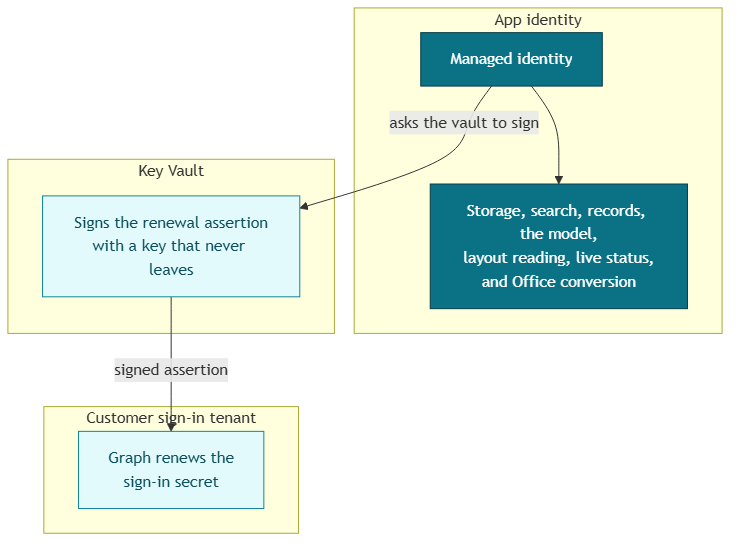
Static Web Apps presents a client secret to the sign-in tenant when it signs people in, because its custom OpenID Connect provider accepts no other credential. A daily job renews that secret through Graph in the sign-in tenant, then writes the new value to the vault with a SecretClient, and that renewal is the one call the app’s identity can’t make. A managed identity can only stand in for an app registration in its own tenant, and an External ID tenant only allows single-tenant app registrations, so the renewal app in that tenant keeps a certificate.
The certificate’s private key is created inside Key Vault as non-exportable, so nobody can download it, the app included. The job builds the client assertion Microsoft Entra expects for certificate credentials, with a header carrying the certificate’s SHA-256 thumbprint and claims naming the renewal app and the token endpoint. It then asks Key Vault’s CryptographyClient to sign the hash, which the vault allows because the app’s identity holds a signing role on that one key. A ClientAssertionCredential exchanges the signed assertion for a Graph token. The managed identity’s job is to ask the vault for a signature, and the certificate’s job is to vouch for the renewal app in the other tenant.
cert = certificate_client.get_certificate(cert_name)  # public part only
header = {"alg": "PS256", "typ": "JWT", "x5t#S256": b64url(sha256(cert.cer))}
claims = {"aud": token_endpoint, "iss": app_id, "sub": app_id,
          "jti": str(uuid4()), "nbf": now, "exp": now + 600}
signing_input = f"{b64url(header)}.{b64url(claims)}"
signature = CryptographyClient(cert.key_id, credential).sign(
    SignatureAlgorithm.ps256, sha256(signing_input)
).signature
assertion = f"{signing_input}.{b64url(signature)}"
A daily check asks a CertificateClient, still using the app’s credential, for the certificate’s public properties, including when it expires, so renewal gets planned weeks ahead. That read never touches the private key, which stays in the vault anyway.
The vault address, the certificate name, and the sign-in tenant and renewal app ids remain in settings. They identify which key the vault should sign with, and they don’t hand the app a login it can paste into another environment and reuse against Blob Storage.
Reality check
A missing grant looks like a broken feature. Uploads fail, search is denied, the model call is rejected, and the indexer can’t start. The repair is permission for the identity in the environment you deployed, which is a different check from a laptop where a personal Azure login happened to succeed. Prove the path with the identity production will use.
The application code doesn’t name the built-in roles for storage, search, Cosmos, or Cognitive Services. Those grants live outside the code. Grant the operations the code performs:
- read and write documents in the document home
- query the search index and update it
- start an indexer run and read its status
- read and write chat history, tag audit, and extraction records
- call the model and read layout
- send events and issue client tokens on the status channel
- write to the one conversion site in SharePoint
- sign with the renewal key, read its public expiry data, and write the renewed sign-in secret
A wider grant left in place after a Friday incident is how that identity grows past the calls it makes.
The local emulator string is the one string left on purpose, and it stays on a developer machine, where it can’t stand in for the blob client. A laptop can convert Office files after that one device-code sign-in, and the hosted path is still proven with the identity production uses.
Several modules each hold a credential instance, which saves each module from passing one object around. Revoke the app’s identity and every one of those clients loses the login together, with no storage key left in an old ticket that can still open the account. Download and preview still go through the Function, and the person’s library check still runs.
Conclusion
Search, the indexing pipeline, chat, and extraction all depend on the app reaching Azure after a file lands in the document home. Those calls are only as private as the login the code presents.
Managed identity is that login for storage, search, records, layout reading, the model, the status channel, and hosted Office conversion. Settings hold account names, endpoints, and deployment names. On the hosted app that credential is the app’s identity, and on a developer machine it is the person already signed in to Azure. Office conversion on a laptop uses the one-time device-code sign-in. The one certificate left belongs to the customer sign-in tenant, and the vault signs with it so its key never leaves.
A document system that reaches its files with a copied string will keep granting that access to anyone who later finds the string, which is why these clients are built so there’s no string to find.
Ideas, opinions, and tone are mine. AI helped with the language.
For more articles on AI-native document management visit the pialgorithms blog.
pialgorithms | document management software | ai engineering services