
Passwords in app settings are a security risk
The system that reads your documents should sign in as itself, not with a password pasted into config.
When a connection string is pasted into a thread
Someone needs a new environment to open the same files production opens. The shortest path the portal offers is to copy the storage connection string into app settings, then drop it in the thread with a note to “paste this so the new environment can read the files.” Passwords in app settings are a security risk because that string is a login to the document home. Pipeline logs can print it, the wiki page outlives the contractor who saved it, and anyone holding the string can read the files in the account, including people you never granted a library.
You can require a company login for every person and still be one copied string away from those files. Rotating the password means finding every copy, and the copy in a six-month-old ticket is the one that keeps working.
The app still has to reach Azure
Where should your documents live treated scattered files as a business decision, and giving documents a proper home showed the home itself, including the rule that the browser is never handed a storage key. Search, the indexing pipeline, chat, and extraction still call Azure after the file is stored. The architecture overview named one shared sign-in for those calls; this article is the security choice inside that sign-in, namely which calls use the app’s own identity and which calls still depend on a password.
The person’s login, meaning which library they may open, stays a separate question. The document home already checks that on each request, and this article stops at the app’s login.
Where passwords in app settings go wrong
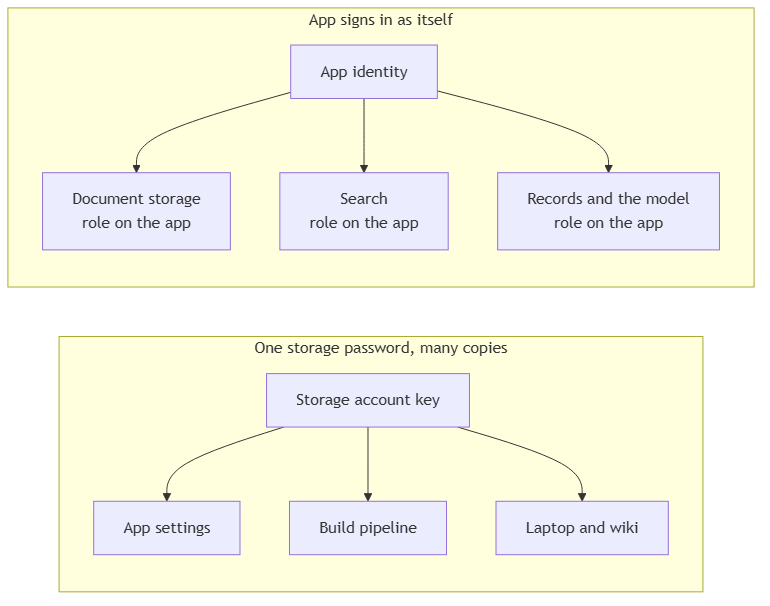
The common trap is filing a password under configuration. An endpoint URL is configuration, while a storage account key, a search admin key, and a model key are logins that sit in app settings because a quickstart put a connection string there and the environment was never cleaned up.
The second trap is a password with no boundary. An account key doesn’t know which container the request was for or which person asked, so holding the string is enough to read every file in the account. Teams can spend real effort on who may open which library, then skip that work whenever the app presents the account key.
The third trap is treating a vault as the end of the problem while the same password is still issued to each environment, read by scripts, and visible to anyone allowed to open the secret. You still have a login to rotate, and anyone who can open the secret can take another copy. A storage key kept in Azure Key Vault is still a password someone can read. Use the vault to keep the one certificate’s key and to sign with it when the app asks, and stop issuing the storage key.
The quieter trap is securing only the person. Company login can be fully in place while app settings still hold a string that reads storage, a string that administers search, and a string that calls the model, and none of those strings check who the person is.
The app signs in as itself
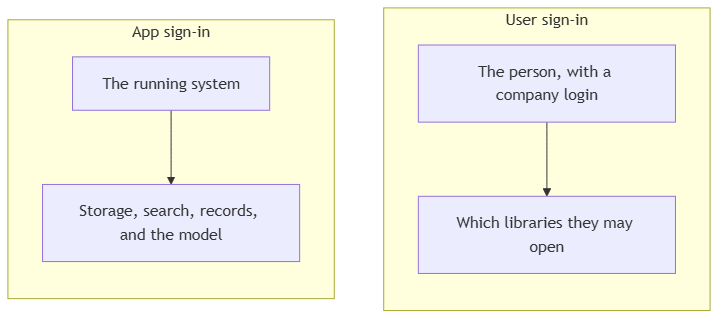
Two logins are involved, and they answer different questions.
User sign-in is the person. It decides which libraries they may open. That check already lives on the document home.
App sign-in is the running system. After the person is allowed in, the app still has to read and write files, query search, run the indexer, keep chat history and extraction records, read documents for layout, and call the model.
Azure’s name for an app sign-in the platform already knows is a managed identity. The app has an identity in the directory. Each service is assigned a role for that identity, and the role is the whole grant. There’s no storage key, search admin key, or model key to paste into app settings for those calls. In production the identity belongs to the app. On a developer machine the same code signs in as whoever is already logged in to Azure, so local work doesn’t require a production password in a file.
A shared password is the pattern those keys belong to, one secret with many copies, and every copy carries the app’s access.
On the document path in this system, app sign-in is what reaches:
- Azure Blob Storage, where originals, canonical renditions, and sidecars live
- Azure AI Search for the search layer, including queries and indexer runs
- Azure Cosmos DB, for chat history, extraction records, and the audit trail on tags
- Azure OpenAI, for chat, figure captions, and per-chunk context in the indexing pipeline
- Azure Document Intelligence, which reads layout during indexing
- Azure SignalR, for the live status channel that exists because a file in the document home isn’t always ready to work with
- Microsoft Graph, for converting Office files into a canonical rendition on one SharePoint site
- Key Vault, when the app signs with its one remaining certificate
One credential is still real, and it should stay named. The front door that signs people in renews its own client secret through Microsoft Graph in the separate directory where your users sign in, and the app’s identity can’t sign in to that directory, so that renewal keeps a certificate. The certificate’s key is created in Key Vault where nobody can download it, and the app asks the vault to sign with it each time, so no copy of the key exists outside the vault. Group lookup doesn’t need Graph anymore, because the sign-in token already carries the person’s groups.
A local storage emulator isn’t an Azure identity, so a developer queue aimed at that emulator can still use a connection string that stays on the laptop and never becomes the password production uses for Blob Storage.
How to tell whether an app setting is a password
If the value contains an account key, a search admin key, or a model API key, the setting is a login. Remove it, and grant the app’s identity the access that key was providing.
If one password can read every container, it has stepped around the library rules in the document home. Limit the app’s identity to the operations it performs on each service. That list is read and write documents, query and update search, read and write chat history and extraction records, call the model, read layout, send live status, convert Office files on one site, and sign with the certificate. Leave subscription-wide control off that identity.
If rotation means searching old tickets, build logs, and wiki pages, the password has already spread. Revoke it once the app no longer presents it, or the old copies remain valid logins.
If a laptop only works when someone pastes a production connection string into a local file, the missing piece is the developer signing in to Azure. Production shouldn’t keep a password so that a developer file can hold one.
If a call still can’t use the app’s identity, keep that single credential, keep its key where nobody can download it, and record why it exists. The certificate for the directory where your users sign in is that case. A service that could accept the app’s identity and still has a key is the case to remove, which is why the status channel no longer has an access key.
If the security work stopped at the person’s company login, the app’s access to the data is still open. User sign-in and app sign-in both have to be in place before access to the files is actually limited.
Reality check
An identity with a missing permission is denied, and the error looks like a broken feature. Uploads fail, search is denied, the model call is rejected, and indexing can’t start. The repair is a role on that identity in the environment you deployed, which is a different check from a laptop where the call happened to succeed.
A developer who can already administer the subscription will hide that gap. Their personal Azure login succeeds in places where the app’s identity would be denied. Prove the path with the identity production will use, or you’ll ship a sign-in that only the builder has.
The vault stays because one certificate has to live somewhere, and the vault is also where its key does the signing. Managed identity takes the shared passwords off storage, search, records, layout, the model, and the status channel, and Office conversion signs in the same way, while that one certificate remains on purpose. Key authentication is turned off on storage, search, records, layout reading, the model, and the live status channel, so a key left from an old quickstart can’t be used.
Permissions drift when someone grants the app a wider role to unblock a Friday incident and the wider role is still there six months later, so someone has to own the list. The app’s identity needs the document operations, the search operations, the record operations, the model, layout reading, live status, the one conversion site, and signing with one key in the vault. It doesn’t need to create accounts or read unrelated systems in the tenant.
App sign-in doesn’t publish the files, because the browser still goes through the authenticated download and preview paths and the person’s library check still runs. Disable the app’s identity, and no storage key remains in an old ticket that can still open the account.
Conclusion
Search, the indexing pipeline, chat, and extraction all depend on the app reaching Azure after a file lands in the document home, and those calls are only as private as the login the app uses.
Passwords in app settings are that login once they leave the portal and enter a setting, a pipeline, or a thread. Use the app’s own sign-in for storage, search, records, document reading, and the model, and grant it only the access each of those services requires. Keep a shared password only where a service still requires one, name that password, and keep it from becoming the pattern for the rest of the system.
A document system that reaches its files with a copied string will keep granting that access to anyone who later finds the string.
The technical pair for this piece is Zero secrets in code: managed identity for service-to-service auth.
Ideas, opinions, and tone are mine. AI helped with the language.
For more articles on AI-native document management visit the pialgorithms blog.
pialgorithms | document management software | ai engineering services