
A file in the document home isn’t always ready to work with
The name can show up in the folder while search, preview, tags, and extracts are still catching up.
When someone says the new file is in the folder
Someone in finance drops a revised rate card onto the shared drive, or overwrites the workbook in the SharePoint library, and pings the thread “it’s up.” A colleague still has last quarter’s Excel open from OneDrive. Another searches the same library and gets the old file, or a preview that hasn’t caught up. A third hits refresh until the date looks new, then saves a copy to the desktop because they don’t trust the folder. This is already how most organizations decide a file is ready to work with, guessing from the folder, the modified date, and whoever shouted first.
The cost shows up in ordinary work and not in an error message. Operations builds a quote from last quarter’s prices because that workbook was still open. Two people edit different copies, then spend the next meeting arguing which file is real. Finance waits on a preview that hasn’t refreshed, then downloads the PDF and works from that. Nothing in the save failed; people treated a filing update as permission to start the next step.
The same wait follows the file into a document system
The thread that said “it’s up” was doing the job a product should do, and doing it badly. Refresh, a desktop copy, and an Excel window that never closed are how people invent a signal for when a file is ready to work with. Putting those files in a document home doesn’t retire that habit. The save still lands first, while opening a preview, finding the file in search, applying tags, and posting an extract still finish later. The folder problem becomes a list problem, with more people depending on a current file.
Where should your documents live already said two people looking at the same library should be looking at the same version. Replacing a document is harder than uploading one and building the upload pipeline that replaces a document cleanly then argued that a replace has to move the whole bundle, not only the bytes in the list, and that upload doesn’t even start the indexer. Those pieces settle what has to move. This piece is the wait left sitting in that thread, namely how the people looking at the library learn the file is usable without guessing from the date.
Where things go wrong
The common trap is treating the list update as the finish line. You put a file in the document home, the name appears, and the job is done. That’s a filing-cabinet instinct, and it’s how shared drives actually work. In an AI document system it’s how you get a current list sitting on top of a brain that hasn’t caught up.
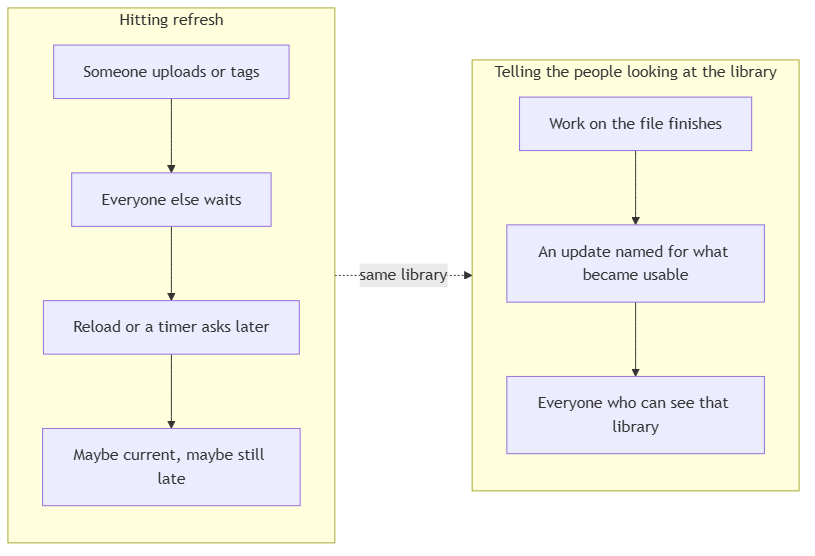
The second trap is refresh as a workflow. People hit reload, or a timer asks the server every few seconds whether anything changed. The person who uploaded waits through lag they invented. The colleague who didn’t upload still works on a stale list until their next tick. You pick between a slow UI and a noisy one, and you still miss the moment preview became available or the indexer finished.
The third trap is one spinner for every kind of wait. “Loading” then stands in for converting the canonical file, running the indexer, applying tags, and posting an extract, all at once, which is to say it stands in for nothing useful. People either ignore it or treat it as a blanket “not yet,” including for work that already finished.
The quieter cousin is using the file the moment the name appears. Chat against chunks that still belong to yesterday, or against no chunks yet because indexing is a separate run from upload, is how a fluent answer quotes the old unit price with a citation that opens the right filename. The model didn’t invent that number from nowhere; the product let someone ask before the search layer had caught up.

What ready to work with actually means
A file is ready to work with in pieces, and those pieces don’t finish together. Call them kinds of ready:
- You can see the filename. The bytes landed in the document home. The list updated. That only means the file is there, while search, preview, and the rest can still be unfinished.
- You can open a preview. The canonical rendition exists, so in-place preview can open. Office files often wait here after the list already moved, because conversion is its own step.
- You can search it and ask chat. The indexing pipeline has finished a run, so search reads chunks built from the current bytes. Upload doesn’t do this for you. The indexer is expensive, shared, and started as its own operation.
- It has tags. Values from the shared vocabulary are on the document and in the search filters. A colleague’s smart-tag run is work in progress until it completes, and an empty tag row isn’t a finished classification.
- It has an extract. A workflow record exists for this file, in a shape another system can consume. Seeing the PDF isn’t the same as having posted operational data.
The product then needs a status channel scoped to the people who can already see that container. When something in the bundle changes, everyone looking at that library gets a named update for that kind of ready (list, preview, indexer running or idle, tags, extract) instead of a generic “something moved” and a hope they’ll refresh.
That scope is the same boundary as the document home. You hear about containers you’re allowed to open, and you don’t hear about the rest. Two people sharing a library stay on the same snapshot because the channel is the library, not the tab that happened to upload.
How to tell whether a file is ready to work with
This gives you a practical test for any UI that looks current.
If the filename appeared in the last minute, don’t treat chat or search as current until the indexer for that container has finished a run on those bytes. A visible file with no new chunks is how last quarter’s price comes back with today’s name.
If preview still won’t open, or still shows the previous PDF after a replace, the canonical rendition hasn’t committed. The list can be honest about the new name and still be early on preview. For a replace whose conversion failed, the honest product keeps the version that already worked instead of advertising a broken one.
If the file type can’t be indexed, the list can still update, and search will never catch up because there is nothing to catch up to. Don’t let a current filename imply a searchable document.
If two people share a container and only the uploader’s screen moved, the library has split. Refresh-based UIs fail this test the moment a colleague doesn’t know to reload.
If the only status mechanism is page load or a timer, you’re choosing lag or load on purpose. A poll that’s fast enough to feel live is expensive when every open tab asks, and a poll that’s cheap is how people use a file that became searchable thirty seconds ago.
If a tag or an extract changed in that container, the people looking at the row need that fact without an extra fetch they invent. Otherwise verification and handoff happen on stale values.
If the status channel is down, mutations still have to succeed. A missing live update is a degraded UI, and a blocked upload because the notifier failed is how you couple filing to a status widget.
Reality check
Named events tell you that work started or finished. They don’t make the indexing pipeline cheap or instant. Layout, figures, and embeddings still take the time they take. The channel’s job is to stop people guessing during that time.
A laptop that slept, a dropped connection, a tab in the background, will miss events. The honest design refetches the list and the indexer state when the connection comes back, instead of pretending the live stream was complete.
Not every screen needs every event. The library view cares that a name appeared and that preview became possible. Chat cares that the search layer caught up. The extraction board cares that a record was posted. Dumping one firehose into every view is how you train people to ignore status.
A live channel costs money and operational attention. At document-heavy usage, the alternative is worse, because every open session polling every few seconds is how you pay more to stay less current. If you skip the channel, you’re betting that people will refresh at the right moment, which they won’t.
Org habit will still treat the list as the system of record for “done.” No notifier fixes a team that asks chat the instant the filename lands. The UI can show each of those jobs finishing, and people still have to read the signal.
Conclusion
The instinct after a file hits the document home is to celebrate the list. That’s how teams ship a current filename on top of yesterday’s search, a preview that’s still converting, tags a colleague hasn’t finished, and an extract nobody has posted, then wonder why the AI sounds sure and is still wrong.
The list only says the file is there. A file is ready to work with for search, preview, tags, or extraction only when that specific job has finished, and those jobs don’t finish together. A document system that never says which of those jobs has finished will keep teaching people to refresh, guess, and use yesterday’s file.
The technical pair for this piece is Building real-time document status with SignalR.
Ideas, opinions, and tone are mine. AI helped with the language.
For more articles on AI-native document management visit the pialgorithms blog.
pialgorithms | document management software | ai engineering services