
Who can open which documents
The document system decides which library each signed-in person may open, and it checks that decision on every request.
A company login opens the front door
A new person on the finance team signs in with the company account, and the screen shows the finance library. Who can open which documents is decided when a request asks for a file, and that request can name any library in the system. The app that reads the document home will fetch the library that was named, because Passwords in app settings are a security risk gave the app its own sign-in, with permission to read the files. The company login gets the person through the front door, and the library decision is what keeps that sign-in inside the files that person is supposed to see.
Where the library list sits
Passwords in app settings are a security risk split the two logins. The person’s login decides which libraries they may open. The app’s login is how the system reaches the document home once that decision is made, including search. That article stopped at the app. This one is the person’s side.
The architecture overview named the front door. Behind it, shared libraries are based on directory groups the company already maintains, each identified person also has a library of their own, and the document home checks every request against that combined list. Search and chat use the same list, so a passage or an answer can’t come from a library the person may not open.
Where this goes wrong
The common trap is treating the company login as the whole access model. Anyone who can sign in is then treated as the same kind of person, and a request that names the finance library is honored for someone in legal, for a contractor, and for someone who left last month and still has an account.
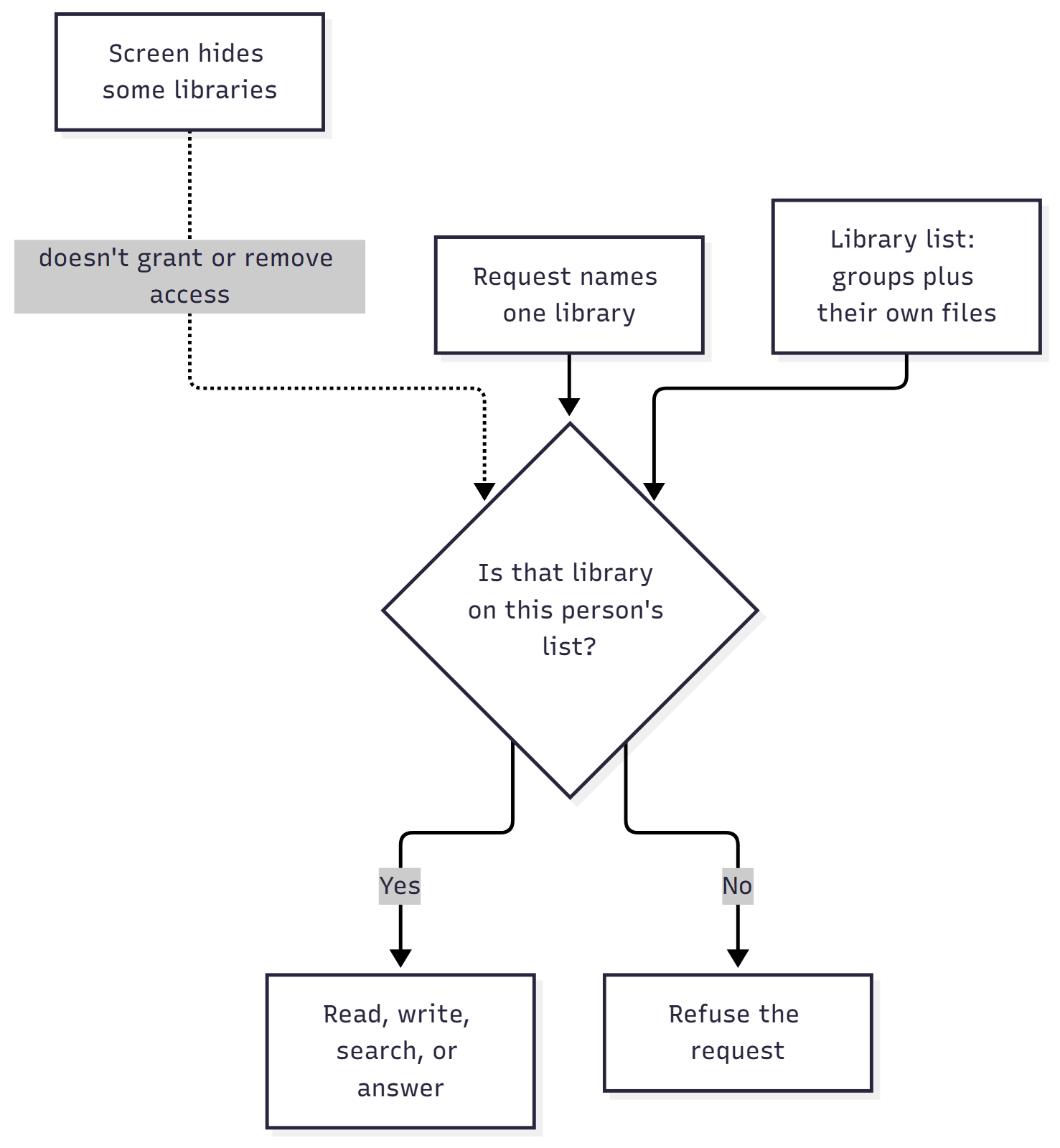
The second trap is hiding libraries in the menu and calling that the control. A hidden row keeps the screen tidy, and the caller can still name the legal library on the request. When the document system accepts the name, the hide changed what people see and left the files where they were.
The third trap is a second list of people, kept inside the document system one name at a time, while the company directory already has a finance group, a legal group, and the project groups. The two lists drift, so someone leaves finance on Friday and can still open the finance library on Monday, because the document home was updated by hand and the update missed them, while the directory already had the change.
The fourth trap shows up when group membership comes back incomplete and someone grants extra libraries so the demo still looks full. When the system can’t tell which groups a person belongs to, the shared libraries that depend on those groups stay closed, and that person’s own files can still open, because those files follow the person and group membership is what opens a shared library. Extra libraries, added so the screen looks complete, turn a missing answer into access to the wrong files.
The fifth trap is treating a personal library and a shared library as the same kind of grant. Personal files follow the person, and shared libraries follow the group. Fold the two together and a new hire either sees other people’s private files or loses the shared work the team actually uses.
Three checks before a file opens
A request has to pass three checks, in order.
Identity. The company login has to produce a specific person. With no identified person, no file opens, and the request stops before any library is considered.
Library list. Shared libraries are based on directory groups. The finance group opens the finance library, and a group that isn’t tied to a library opens nothing, so a generic signed-in membership can’t become a key to every file. Beside those shared libraries, each person has a personal library based on their identity. It’s created the first time the system needs to give them a place for their own files, and another person’s group membership doesn’t put documents there.
Requested library. The request names the library it wants, and the document system allows that name only when it sits on this person’s library list. When the person may open only their own library, the request can omit the name and that library is used. Once a directory group adds a shared library, the list holds several, so the request has to name one, and the system doesn’t choose. A request that names a file without naming a library is looked up only inside the libraries that person may open. One match is enough, and two matches still need a name.
Search uses the same list. Filters the person sets are narrowed to libraries they may open, and when that leaves nothing, search doesn’t run. Chat retrieves through that search layer, so an answer stays inside the same boundary. Download and preview, which the document home already serves without handing the browser a storage link, run only after the same check.
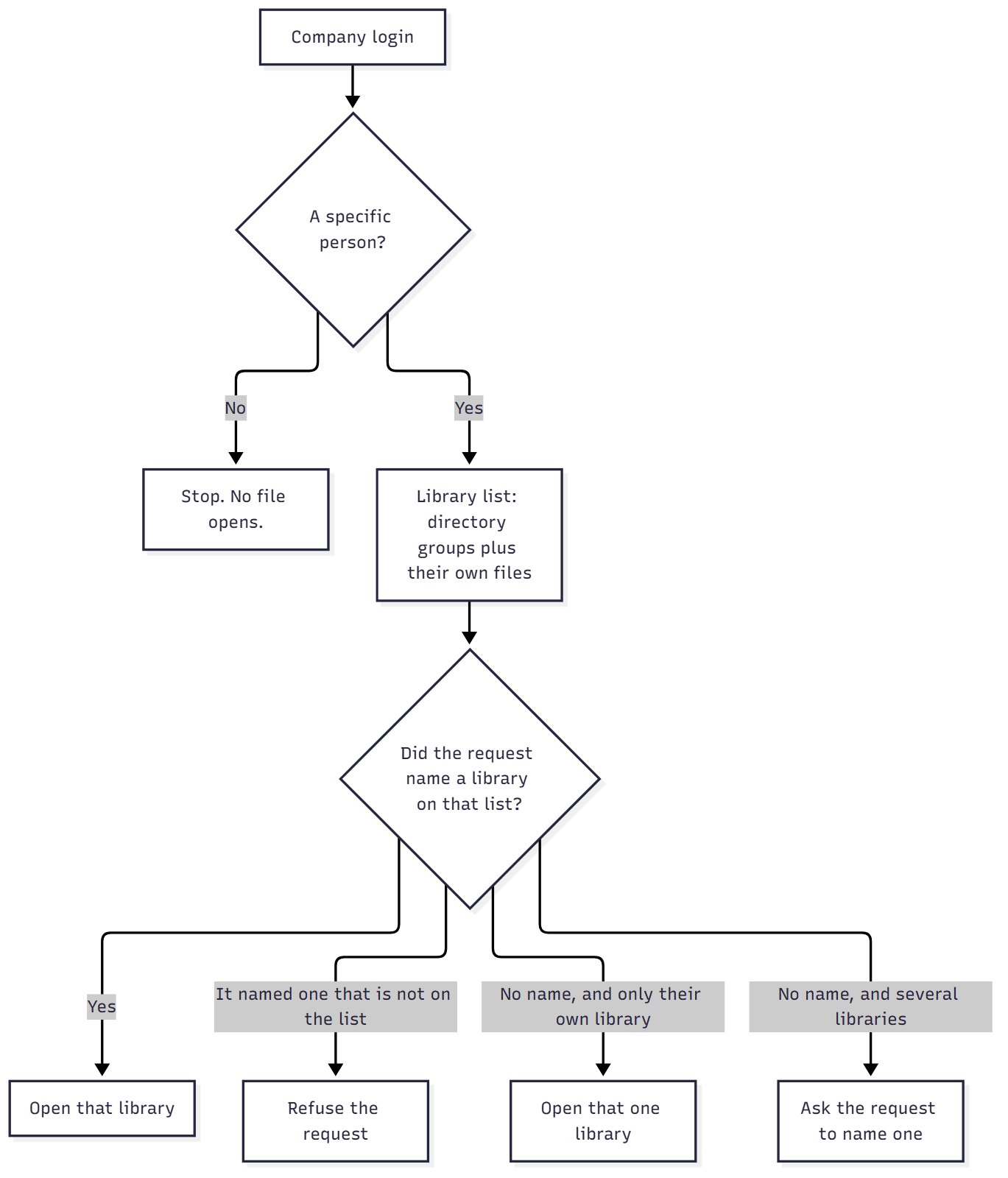
How to decide who can open which documents
If the only control today is the company login, put the library list on the document system and check the named library there. The menu can keep showing a shorter set. The check still has to live on the request, because someone who calls the system without opening the screen can name a library the menu would have hidden.
If a directory group should open a shared library, tie that group to that library, and let the people who already administer groups own the membership. A group with no tie opens no shared library. Adding people inside the document system, alongside the directory, recreates the second list that drifts.
If the system can’t tell which groups the person belongs to, leave those shared libraries closed. The personal library still opens.
If the person may open several libraries, the request has to name one, unless it names a file that exists in exactly one library they may open. The system doesn’t pick whichever library is listed first, because that guess is how a contract ends up stored where the rest of the team will never look.
If someone leaves a team, take them out of the directory group. The library list is fixed when they sign in, so the shared library closes the next time they sign in. Membership is remembered briefly, so the change can take a few minutes, and a sign-in that is already open keeps the list it was given.
If the app’s own sign-in can read the document home, this check keeps that sign-in inside the libraries the person was granted. Passwords in app settings are a security risk took the copied password off that path. Who can open which documents is the decision that piece left for this one, and both have to be in place before a file is limited to the right person.
Reality check
Someone other than the team that built the screen has to own which directory group opens which library. Those owners are usually the same people who already administer groups. A wrong tie is an access bug, and finance pointed at the legal library won’t announce itself in a demo where every tester can already open everything.
People whose group membership comes back incomplete see fewer shared libraries until the directory can answer fully. That’s the safe outcome, and it will annoy anyone who expected the screen to paper over the gap. Opening extra libraries to hide the gap is how the files leak.
The personal library is a real library. It gets a canonical copy in the document home, it goes through the indexing pipeline, and it can be found in the search layer. The same upload rules apply to it as to a shared library. It’s a poor place to keep the team’s shared contracts, because a department that stores that work only in personal libraries has scattered the files again, inside the document home, where search and chat can see them for that one person.
An account that can already open every library will hide a broken map. Prove the setup with a person who should see finance and nothing else, then send a request that names a library they shouldn’t see. The second request has to be refused while the first screen still looks right.
This check leaves tag vocabulary, retention, and group administration with the people who already own them. Consistent tags stay their own ownership problem, and the app’s sign-in in Passwords in app settings are a security risk still has to be in place before the files are limited to the right person.
Conclusion
Who can open which documents comes down to three answers the document system has to hold at once: the company login says who the person is, directory groups plus a personal library say which libraries they may open, and a request may name a library only when that name is already on the list. The check runs on every request that reads a file, writes one, searches the search layer, or asks chat for an answer. A menu that shows the right libraries is a convenience on top of that check, and the check is what keeps the app’s access to the document home inside the libraries that person is allowed to open.
The technical pair for this piece is Easy Auth and the check that decides which library opens.
Ideas, opinions, and tone are mine. AI helped with the language.
For more articles on AI-native document management visit the pialgorithms blog.
pialgorithms | document management software | ai engineering services