
Building layout-assisted field extraction
Reuse the layout map already stored at index time, match each extracted value back to a page region, and return boxes the preview can paint.
This article is the technical pair for Make AI answers auditable. The business pair makes the case for field-level page proof; this one is about the layout load, value search, and overlay that make that real.
It also builds on Building schema-first extraction with validators and on The architecture of AI-native document management software.
The extract can be right and still uncheckable
The extract endpoint returns typed JSON and a 200. Schema passed. Optional rules logged their warnings. Azure Cosmos DB has the request and the response. Then a reviewer hovers “Net 30” and the preview stays dark, which is the gap layout-assisted field extraction exists to close. The locate step never ran, or it ran against a missing layout sidecar and correctly returned an empty list. Nothing in the model call failed.
This piece is that locate step. After the engine has a shaped record, it loads the layout JSON already stored at index time, searches each extracted value back into that map, and returns percentage boxes the preview can paint. Asking the model for page numbers is a second guess on top of the extract, whereas location is a search against evidence you already paid to store.
Where this sits after the schema lock
The previous article locked output to a schema, kept business rules optional after parse, and persisted an audit trail of what the model was shown and what it returned. That settles whether another system can consume the record. It doesn’t settle whether a person can check a field against the page without downloading the file.
The business pair split those jobs into consume and verify. This article is the engineering behind verify. The indexing pipeline already built a layout sidecar when it read the canonical copy with Azure Document Intelligence prebuilt-layout. Extraction reuses that sidecar; it doesn’t call Document Intelligence again, and it doesn’t look up locations in the search index. Chunks fed the model, and layout feeds the overlay.
Chat already learned that a good answer carries citations you can open. Extraction needs the same instinct at field level, tied to polygons on a page.
Where things go wrong
The naive build asks the model to emit a page number next to each field. Page numbers are tokens that drift, collide when the same amount appears twice, and never give you a box the preview can paint. Reviewers learn that “page 12” can’t be trusted, so they open the PDF anyway; you spent a model call on theater.
The quieter trap is coarse highlighting. You take the first paragraph or table cell that contains the string and paint the whole region. “Net 30” lights up a payment-terms block the size of a business card, or a “delivery date / window” cell that holds both the from and to dates. The overlay is technically a hit and practically useless. After two sessions, people ignore it.
The third trap is coupling verify to consume. A missing layout sidecar, or a value the locator can’t place, is treated as a failed extract, so a perfectly shaped invoice never reaches review because the highlight step threw. The other version of the same trap is inventing a box so the demo never looks empty. Both collapse the two gates the business pair exists to keep apart. Locate is allowed to return nothing, and extract is still allowed to succeed.
Layout-assisted field extraction as a short stack
The locate path runs after parse, on the same engine call that produced the shaped record. It has a different job from schema and validators, and a failure in it must not rewind the extract.
Load the map you already stored
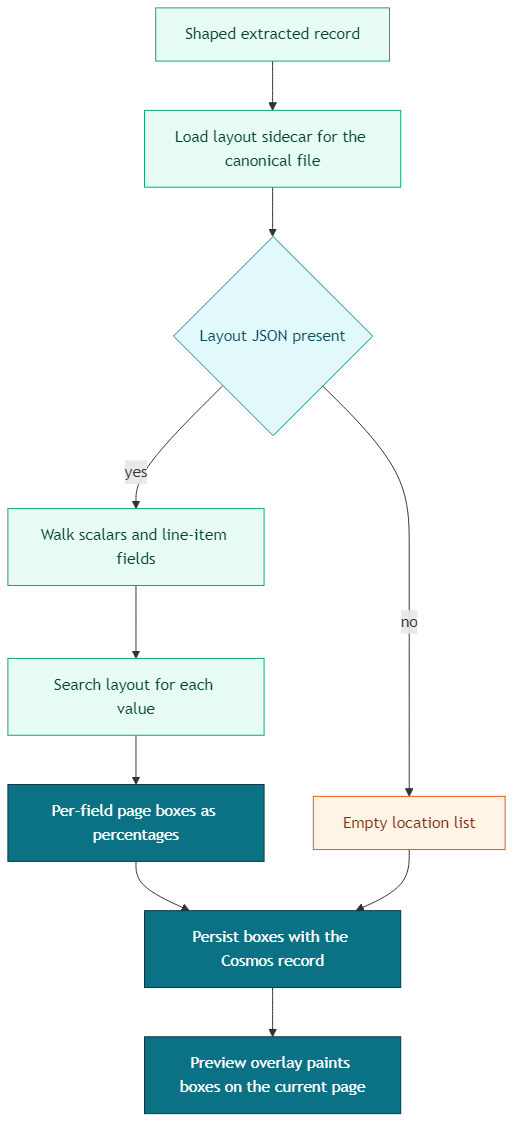
The loader resolves the canonical blob for the source file, rebuilds the same storage path the indexing pipeline used when it wrote the sidecar, and fetches that JSON from the dedicated layout container in Azure Blob Storage. The name has to match the indexer exactly. A near-miss path is a silent empty overlay, because there is no second layout to fall back on.
The payload is Document Intelligence’s analyzeResult (pages with word polygons, plus tables, key-value pairs, and paragraphs with bounding regions). If the blob isn’t there, the loader returns nothing and the engine continues with an empty location list. Missing layout is a skipped verify step; the extract still succeeds.
Walk every scalar worth pointing at
The mapper walks the extracted object. Top-level scalars become keys like buyer_name. Line items become keys like items[0].quantity, an address the form table and the overlay share. Empty and null values are skipped, because there is nothing to search for. Nested objects that aren’t line-item rows are not located as a unit; the overlay highlights values, and whole subtrees stay unlocated.
Date fields are flagged by an allow-list of known keys plus a _date suffix, so delivery_reference isn’t expanded into date formats by accident. That flag changes the search policy later. It doesn’t change the schema. The schema-first article already forced dates to ISO at the model boundary; the locator has to search for how those dates were printed.
Search the layout, don’t re-ask the model
Each value is expanded into the strings the page might actually contain, then searched in a fixed order. Word-level search runs first, because a word polygon is a tight box. Table cells, then key-value pairs, then paragraphs, run only when words miss, and only for non-date fields. Dates that miss at word level return no box. A wide cell that happens to contain the date would look like a hit and teach reviewers to ignore the overlay.
Boxes are stored as percentages of page width and height (left, top, width, height on 0 to 100), converted from Document Intelligence polygons in inches. The preview paints with CSS percentages, so zooming the viewer doesn’t require a second coordinate system.
A located field looks like this:
{
  "fieldKey": "payment_terms",
  "boundingBoxes": [
    {"pageNumber": 12, "left": 18.4, "top": 42.1, "width": 9.6, "height": 1.4}
  ],
  "matchedText": "Net 30"
}
The extract response includes field_locations, that list of per-field boxes. The same list is written onto the Cosmos record with the shaped data, so a later open of the form still has highlights without running locate again.
The engine wraps load-and-map in a best-effort path. Layout errors are logged as warnings and the extract still returns the shaped record with an empty list.
locations = []
try:
    layout = load_layout_sidecar(storage, file_name, container)
    if layout:
        locations = locate_fields(layout, extracted)
except Exception:
    locations = []  # locate must not fail the extract
Paint what you found, on the page the reader is looking at
The preview overlay is a layer on the current page of the in-app viewer. It keeps boxes whose pageNumber matches that page and ignores the rest until the reader turns to them. Hovering a form field that has a location pulses the matching boxes; hovering a box lights the field. Fields with no location simply have no hover linkage, which is the honest empty state the business pair asked for.
How to decide what to match and how tightly
This is the if-then test the locator exists to support.
If the layout sidecar is missing, return an empty list and still persist the extract. You can’t retrofit trustworthy boxes from the JSON alone. The map has to exist before locate runs, which is why skipping layout at index time to save money shows up later as a blank overlay in finance review.
If the value is empty or null, skip it. If it is a line-item scalar, address it as items[n].field so the table row and the box share a key. If the same string appears in a short dedicated cell and as a fragment of a long address block, prefer the dedicated cell. “Piraeus, Greece” as a port-of-loading value should light the port cell even when the same words also sit inside a longer address.
If the field is a date, expand the ISO value into the printed forms documents use (full month, abbreviated month, day-first, slash forms), search at word level, drop boxes that are wider than a quarter of the page, and drop any box that strictly encloses a tighter one. When nothing precise remains, return no highlight. Composite “date / window” cells are why dates skip the cell fallback.
If the field is a number, expand thousand separators and trailing-zero forms (5000, 5,000, 5,000.00) so a typed amount still finds the printed one. Then run word-level search. Only when that misses should you fall through to cells, then key-value pairs, then paragraphs, and paragraphs only when nothing smaller matched, because a paragraph box is the coarse trap from earlier.
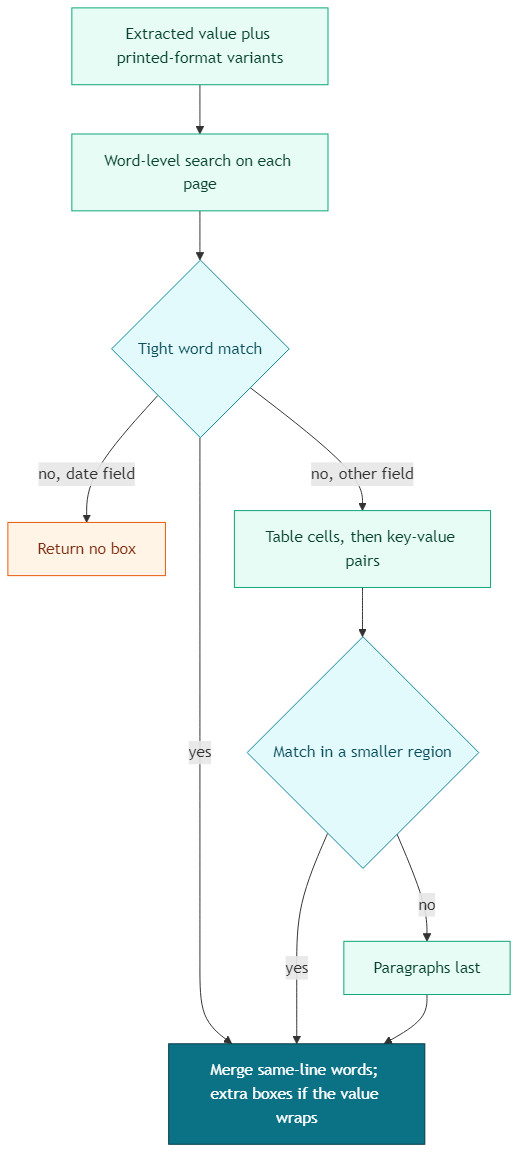
For multi-word values, score candidate sequences by how close the words sit in reading order and on the page, keep the best sequence, drop the partial hits, and merge words on the same line into one box. If the chosen sequence wraps, you get one box per line. Single-word values can still appear more than once; the locator keeps those hits, and the overlay will paint them on whatever page the reader opens.
If locate throws, swallow it, log a warning, and return the shaped record anyway. Verify is allowed to be incomplete; consume can’t look like it failed because the highlight step did.
Reality check
The layout sidecar is paid at index time, one Document Intelligence call per file, reused on later indexer runs because the sidecar already exists. Locate is extra work on every extract, walking words (and sometimes cells) for each scalar. That cost is CPU and latency on the function, and it still grows with page count and field count. Budget for it on long contracts. Don’t pretend a 40-page file locates for free.
Matching stays heuristic. Repeated totals, amounts that also appear in line items, and dates written in three formats on the same page will miss, collide, or return more than one box. The date policy (no coarse fallback) is a product choice that prefers a blank overlay over a misleading one. Teams that want “always a box” will fight that choice in demos and lose trust in review.
The overlay is page-scoped. Boxes carry a page number; the layer only paints the page currently on screen. Hover doesn’t jump the viewer. Reviewers still turn pages inside the preview. They shouldn’t have to download the original, and they also shouldn’t expect the form hover to teleport them to page 12.
Provenance doesn’t replace the consume gates in schema-first extraction. A highlighted wrong amount is still wrong, and easier to catch, which is the point of the overlay in review. Schema and rules still decide whether another system should load the record. Locate decides whether a human will stop hunting through the file.
And none of this repairs a missing sidecar. If the indexing pipeline never stored layout for that canonical copy, extraction has nothing to search. The blank overlay is then a storage and indexing problem.
Conclusion
Once the extract returns valid JSON, the demo instinct is to treat the form as finished work. That instinct is how teams ship consumable records that still force every careful user back into the PDF, and then wonder why the overlay feature never changed behavior.
The engine that gets lasting value from extraction keeps locate as its own step. It reuses the layout already stored at index time, searches each extracted value back into word polygons before coarser regions, persists percentage boxes with the record, paints them on the current preview page, and leaves the extract intact when the map is missing or a value can’t be placed. Auditable extraction is that locate step on stored layout.
Ideas, opinions, and tone are mine. AI helped with the language.
For more articles on AI-native document management visit the pialgorithms blog.
pialgorithms | document management software | ai engineering services