
Building the indexing pipeline that decides what your AI can find
How indexers, skillsets, and custom Web API skills turn stored documents into searchable chunks
This article is the technical pair for What your AI silently misses in your documents. The business pair makes the case that the indexing pipeline silently decides what an AI can find; this one is about how that pipeline is actually built.
It also builds on Building the search layer that makes documents findable, which described the search index that this pipeline writes into, and on The architecture of AI-native document management software, which introduced the storage, processing, search, query, and action layers.
Why indexing needs a lifecycle and not just a trigger
Most people judge an AI document system by its downstream services (e.g. an AI chat assistant). Underneath these services sits an indexing pipeline that runs whenever a document is uploaded, overwritten, or otherwise changed, which turns each file into searchable chunks. If part of a document never lands in a chunk, search and the services built on top of it will never see it. In that case, poor AI output may not be a model problem, but an indexing one.
Chat, search, and extraction all depend on the chunks written into the index, so the index has to reflect the latest state of the document library. The pipeline should process only changed documents, handle overwrites cleanly, keep costs predictable as the library grows, run per document container, and continue when one file fails instead of aborting the whole batch.
A common first approach is to start indexing directly from the upload endpoint as soon as a file is saved. That works for a simple first upload, but it doesn’t give you a complete indexing lifecycle. When a revised file replaces an older one under the same name, the old chunks, layout JSON, or figure crops may remain unless the system explicitly removes them. Chat can then cite text from a version of the document that no longer exists. Rebuilding the index later can also become expensive, because the upload handler doesn’t naturally know which files changed and which ones stayed the same. If one file is corrupted, unsupported, password-protected, or too large to process, it can stop the whole indexing run instead of being skipped and reported. Different file types also need different handling, but this pattern often pushes PDFs, spreadsheets, and images through one generic process. When AI-powered chat, search, or extraction returns incomplete or outdated results, the issue may be the indexing pipeline, not the LLM.
This article walks through how that layer is built using three Azure AI Search primitives (datasource, indexer, and skillset) plus a couple of custom Web API skills hosted on Azure Functions. The chunks produced from the indexing pipeline land on the search index laid out in the last technical article of the series, which explains how the search layer is built.
Where naive pipelines break
The upload-triggered function pattern fails for three reasons that have nothing to do with how good the processing code is:
- There’s no change detection, so a re-run is always a full re-run, which makes any reprocessing on a corpus of more than a few thousand documents prohibitively expensive.
- There’s no failure isolation, so a single bad blob in a batch takes the whole run with it.
- There’s no branching by file type, so a spreadsheet goes through the same layout reader as a PDF, even though layout extraction is the wrong tool for row-and-column data.
The Azure AI Search indexer-and-skillset pipeline addresses all three out of the box, which is why this pipeline is built around it instead of replacing it with a custom orchestrator.
The architecture in five pieces
The whole pipeline is five moving parts:
A datasource points at the {container}-canonical Blob Storage container introduced in Giving your documents a proper home, so the indexer sees canonical PDFs (and tabular sidecars) rather than originals in any format.
Each source container has its own indexer, but every indexer writes its chunks into the same search index. When a document is uploaded or overwritten, the platform resolves which container changed and runs only the matching indexer. Multiple indexers can run in parallel and write into the same search index, so each document area can be processed independently without forcing a full library-wide run.
The container-to-indexer mapping is stored in an environment variable. At runtime, a small Python wrapper around Microsoft’s SearchIndexerClient from the azure-search-documents SDK reads that mapping and triggers the right indexer.
Personal user containers are handled differently. Because each user has their own private document library, the system matches those containers to indexers by naming convention instead of requiring one configuration entry per user.
A skillset chains the actual document processing. The platform exposes two custom Web API skills, both hosted as routes on the same Azure Functions app:
di_layout_store_skillbundles layout extraction, chunk shaping, tabular branching, figure cropping, and per-chunk contextual enrichment.image_caption_skillcaptions each cropped figure produced by the layout skill.
Sidecars carry derived state between runs and across services. Layout JSON lives in a dedicated di-layout-json container, tabular row groups live next to the canonical PDF as .rowgroups.json blobs in the same canonical container, and figure crops live in di-figure-images. Each container is set by an environment variable, and the canonical container is the one already used by the storage layer.
Integrated vectorization writes the text_vector field on the index. This is the embedding field, where Azure AI Search stores the numerical representation of each chunk’s text for vector search. The application code never embeds text itself, neither at indexing nor at query time, which removes one whole class of failure modes, such as out-of-sync embedding model versions, at the cost of binding the index to one vectorizer configuration.
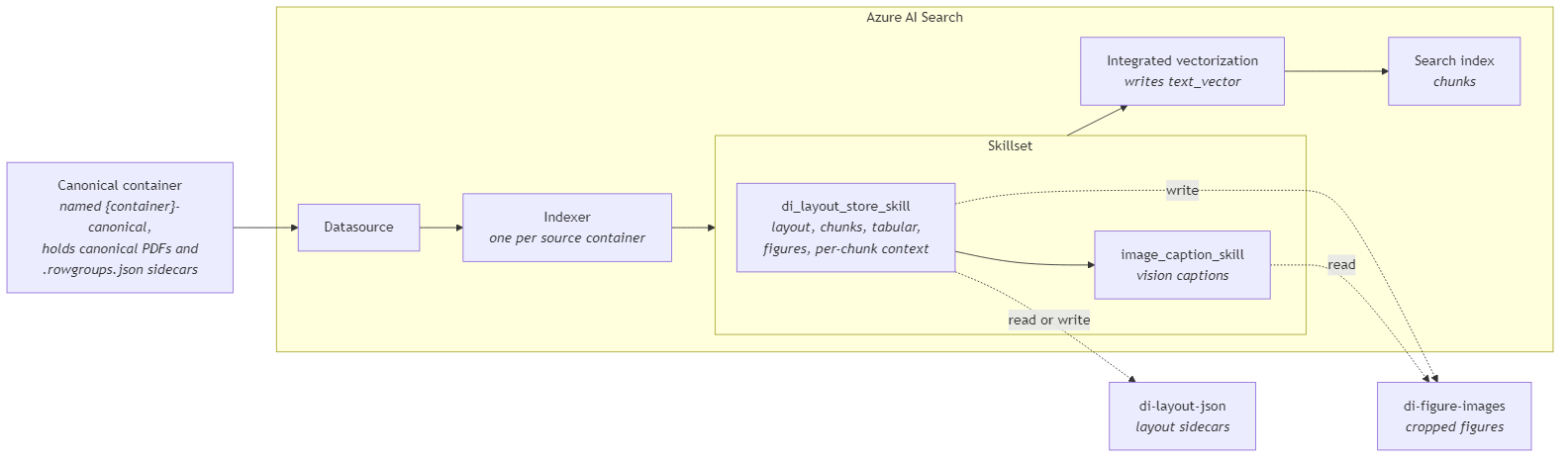
What runs in each skill
The pipeline uses two custom Web API skills. The first one prepares document content for indexing. The second one turns cropped figures into searchable captions.
Inside di_layout_store_skill
The skill receives the canonical file and decides how it should be processed.
For PDFs and images, it calls Azure Document Intelligence prebuilt-layout model. The full layout result is stored as a JSON sidecar in the di-layout-json container, so the same output can be reused later by the document viewer and extraction workflows downstream services, and future indexing runs without analyzing the same file again.
The skill then uses the extracted layout to form the document’s content into searchable chunks. Paragraphs and tables are ordered by their position in the document, grouped by page, and split into chunks with a size limit and small overlap. Tables are rendered as markdown, so rows and columns remain understandable instead of becoming flat text.
Spreadsheets and CSV files however aren’t sent to Document Intelligence. During upload or overwrite, the platform extracts row groups using openpyxl for .xlsx files and Python’s standard csv module for CSV files. Those row groups are stored as a .rowgroups.json sidecar next to the canonical file. The skill reads that sidecar and turns each row group into structured chunks that preserve sheet names, headers, and rows.
The same skill also handles figures. It uses the figure regions detected by Document Intelligence, crops them from the page using PyMuPDF for PDFs and Pillow for image files, removes near-duplicates with a perceptual hash, and stores the remaining crops in the di-figure-images container. Those cropped images are then passed to the next skill for captioning.
Finally, the skill adds per-chunk context. A separate helper calls Azure OpenAI through the Responses API so that each chunk gets a short context line explaining where it sits inside the parent document (the contextual retrieval pattern). That context is stored separately in chunk_context and also included in the text that gets embedded, so retrieval has both the chunk content and the surrounding meaning.
Inside image_caption_skill
This skill receives one cropped figure at a time and sends it to a vision-capable Azure OpenAI model through the Responses API. When Document Intelligence also returned a caption for that figure, the skill passes it into the vision prompt as a hint and stores it in chunk_context so search and RAG can use the document’s own label. The model’s caption is written into the searchable chunk content, so diagrams, charts, screenshots, and other visual content can be retrieved by the search layer instead of being ignored as invisible pixels.

Reality check
Every indexed document costs one Document Intelligence call (skipped on every subsequent re-run because of the layout sidecar), N contextual-retrieval calls (one per chunk), M captioning calls (one per surviving figure), and one integrated vectorization pass per chunk on the search side. None of these are individually large, but they multiply with the corpus size and the rate of change, so the spend has to be sized before the pipeline is turned on at scale rather than rediscovered in the next invoice.
The layout sidecar helps control that cost. Once the layout JSON has been created, the same result can be reused on later runs instead of calling Document Intelligence again. So if the index needs to be rebuilt because of a schema change or a skill update, the expensive layout-reading step doesn’t have to run again for unchanged documents.
Failures also need proper visibility. A custom Web API skill can return errors per document, so one corrupted or unsupported file does not have to stop the whole batch. But this also means a successful HTTP response does not prove that every document was indexed correctly. The reliable place to check indexing success is the indexer status, for example through SearchIndexerClient.GetIndexerStatus. If monitoring only looks at function logs and ignores indexer status, silent indexing failures will be missed.
Conclusion
The skillset model is what turns the silent-miss problem from a vague quality issue into a finite list of named, observable, individually budgeted steps. The indexer pipeline makes the work incremental, the sidecars make expensive results reusable, the two custom skills separate layout processing from figure captioning, and integrated vectorization keeps embedding logic out of the application code.
Those design choices determine whether the system stays reliable, affordable, and maintainable as the document library grows. The indexing pipeline controls what downstream services can retrieve, cite, and use, which makes it a core component of any production-grade AI application.
Ideas, opinions, and tone are mine. AI helped with the language.
For more articles on AI-native document management visit the pialgorithms blog.
pialgorithms | document management software | ai engineering services