
A better way to search documents
Why document management needs search systems, not just search bars
After storage comes findability
After a document home is in place, the next problem is finding the right information inside it fast enough to act on it, and that is what findability means in practice. Most AI capabilities integrated in document management software first need to find the right information before they can do anything useful. Chatting with your documents, extracting data in structured format, or automating document workflows, all depend on the quality of the search layer. So when those capabilities disappoint, the cause is often the search underneath rather than the LLM that sits on top and deliver the responses.
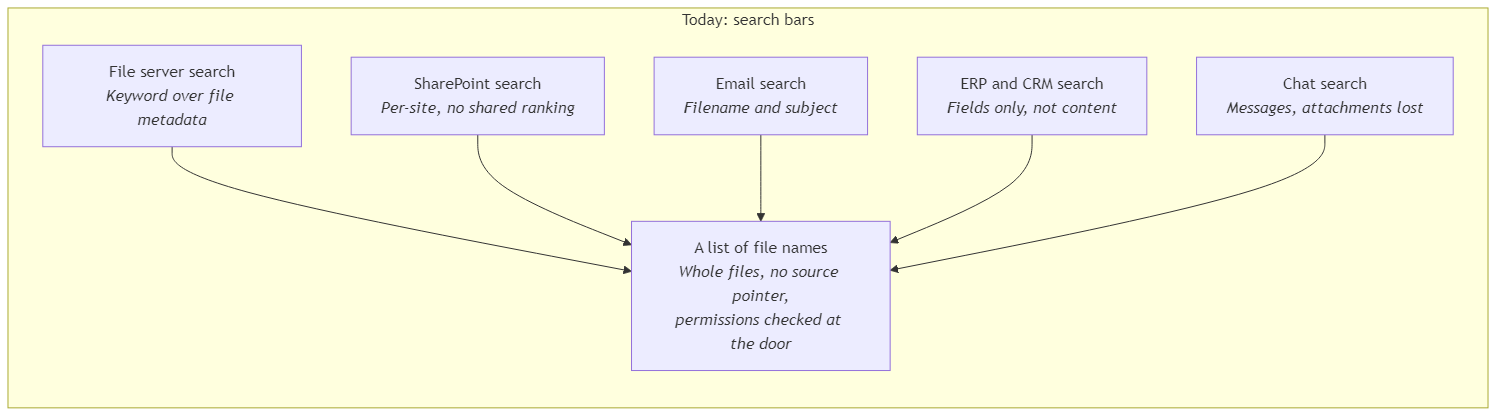
Most organizations have search bars sitting inside every system they own (file servers, SharePoint, email, ERPs, the CRM, chat tools), yet almost none of them have anything that behaves like a designed search system, and that gap is the reason the same teams who already invested in storage still cannot get reliable answers out of their documents.
In my previous article I walked through how to build a proper document home focusing on where documents live, and briefly mentioned search as a first-class feature that the home has to support. This piece is about that search feature, because findability is a separate design problem on top of the document home. It uses the same documents but it has different mechanics, different trade-offs, and different ways of going wrong.
Where things go wrong today
In many document systems, native search is still mainly keyword-based retrieval over file metadata and a basic full-text pass over the document body, which means the user has to guess the same words that the document happens to use, and any rewording, synonym, or paraphrase quietly disappears from the result list. And even when the right document does come back, it comes back as a file name in a results list, so the user still has to open it, scroll to the right section, and confirm the answer manually. At that point the search bar is functioning as a navigation aid rather than as a retrieval system.
Filtering is usually built around generic file properties such as date, owner, and file type. Those filters are useful, but they rarely reflect how the business actually thinks about documents (supplier, customer, project, contract type, invoice status, department, confidentiality, and so on). Some platforms support tagging, but unless the tag vocabulary is shared and consistently applied, the result is still fragmented. As a result, two people looking for the same supplier across different teams can end up running two separate searches in two separate systems, each with its own scope and its own results. There is no single way to ask the organization’s document platform one question and get a consistent answer back.
Even when a platform searches inside the document body, important content can still be missed if the underlying search layer is not built properly. Tables inside spreadsheets, scanned pages without reliable OCR, and embedded figures or charts often need separate processing before they become searchable. Without that processing, the system may find the document while still missing the exact table, page, figure, or data point that contains the answer.
What a search system actually has to do
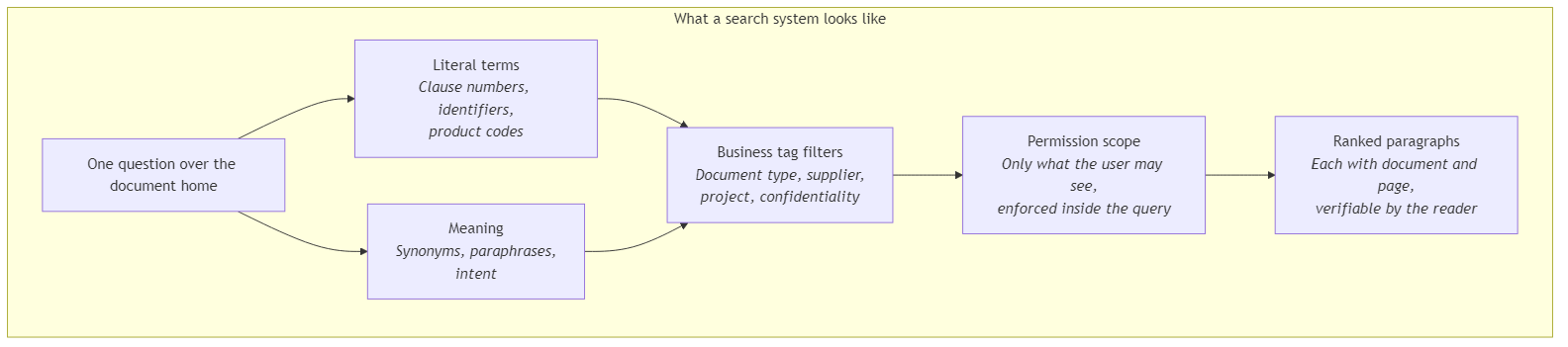
A search system is the layer that turns a document home from a place where files are stored, into a place where information can be found, verified, and used. To do that effectively, it has to combine a few properties that basic search bars usually treat separately (if treat them at all).
1. Return the right part, not the whole file
The unit of retrieval has to be a chunk of the document (a paragraph, a page, a table row group, a captioned figure), not the document itself, because a result that hands back a 200-page contract when the user only wanted a single clause, may technically count as a search result, but it still has a long way to go before it becomes a useful answer. In RAG and AI search systems, this process is called chunking. Each chunk should link back to its document, page, and section, and the user gets a paragraph with a citation rather than a file with a guess.
But chunking creates another problem: once a paragraph is separated from the rest of the document, it can lose the context that made it meaningful. A clause that says “as described above” or “subject to the conditions in Section 4” may be technically retrieved correctly, but still be hard for the model to interpret on its own. This is where contextual RAG helps. Each chunk carries a short context description explaining what it refers to and where it fits in the wider document, so the retrieved text is not treated as an isolated snippet.
2. Search needs both exact words and meaning
A complete search system runs both lexical retrieval (also called full-text search) and semantic retrieval (also called vector search) over the same query, and then merges the results into one ranked list, because each mode catches what the other misses. That merge is called hybrid retrieval. Lexical retrieval is strong when the user searches for exact wording, such as clause numbers, product codes, internal identifiers, or legal terminology. Semantic retrieval is useful when the user asks about ”termination notice” but the document says ”window for ending the agreement”. Hybrid retrieval brings back a stronger candidate set, and a final relevance pass can re-rank those candidates so the best matches rise above the merely plausible ones. This last reranking stage is called semantic ranking.
3. Filter by business meaning before retrieving
Tags such as document type, supplier, and region, narrow the search space before the system ranks the most relevant results. Narrowing the search space first keeps results sharp and costs predictable as the stored documents grow. Without filterable business attributes, the system has to search across the whole document storage every time, which gets slower, noisier, and more expensive with the addition of more documents.
4. Every result needs a source
Every search result has to come back with the document it came from, the page it sits on, and enough context to explain where that chunk sits inside the source document. That attribution is what turns a search hit into something the user can verify and act on, rather than a sentence they simply have to trust. Source attribution also supports the AI features above the search layer, because citations in a chat answer or structured extraction depend on each chunk carrying a clear link back to its source document, page, and location.
5. Keep search aligned with document changes
An index is the searchable version of the documents. It stores chunks, metadata, tags, and embeddings (numerical representations of text that capture its meaning and are used in vector search) that lets the system find relevant content quickly without scanning every file from scratch.
The index has to reflect the current state of the document estate without forcing a full reprocess every time a document tag is corrected or a document is replaced. If the only way to update tags is to reindex everything, the system either falls behind or burns cost trying to keep up, and either way the user notices.
6. Speed as a first-class property
Another important measure of a search system is the time between the question and a verified answer. In urgent cases, a user needs to reach specific information fast, without manually searching folders, opening files, and scrolling through pages. If the system still depends on that process, it is not functioning as search anymore. It is functioning as delay.
7. Permissions inside the query, not just in the UI
A user must not be able to retrieve content they are not allowed to see, and in AI-powered retrieval that is harder than it sounds, because the model in a chat or extraction flow consumes the chunks the search returns rather than the chunks the UI later decides to display. Filtering results after the fact in the rendered citations is not a security model, since by that point the model has already read the protected content and can quote, paraphrase, or summarize it back to a user who was never authorized to read it. The only reliable enforcement is to scope every query to the workspaces, folders, or document scopes the authenticated user is permitted to read, before the search runs.
Reality check
A search index is not a database, in the sense that results are ranked approximations rather than deterministic answers, and tuning relevance is an ongoing design exercise rather than a one-time configuration. Teams used to SQL semantics tend to find this uncomfortable at first, and pretending otherwise is how organizations end up with search systems they don’t trust because the expectations were misaligned from day one.
Search has real, recurring costs (vector embeddings on every chunk, vector storage at the scale of the document collection, query compute on every interactive search call, and reprocessing whenever the schema or embedding model changes), so cheap search is usually where production quality starts to break. Underfunding the layer through which every AI capability passes, is the unbeatable way to ship demos that look fine, and production systems that fail.
Without governance over the tag vocabulary and the document quality feeding the index, even a well-designed search system degrades sooner or later. Tags drift, naming conventions blur, low-quality scans accumulate, and the same retrieval failures the organization moved away from start showing up inside the new system.
Conclusion
Storage and search solve different problems on the same documents, and assuming the search problem disappears once storage is fixed is how organizations end up with a tidy document home that nobody can reliably retrieve from.
Findability is its own design problem with its own granularity, its own retrieval mechanics, its own permission model, and its own ongoing cost, and any AI capability layered on top inherits the quality that the search layer is built on.
Organizations that take this layer seriously think of it is as a designed system and not as something they simply switch on. They fund it accordingly and they keep the tags, document quality, and indexing rules maintained over time rather than treating them as a one-off setup task.
The technical pair for this piece is Building the search layer that makes documents findable.
Ideas, opinions, and tone are mine. AI helped with the language.
For more articles on AI-native document management visit the pialgorithms blog.
pialgorithms | document management software | ai engineering services