
What your AI silently misses in your documents
The processing steps between a stored document and a usable answer
The black box between upload and answer
Most users only ever see two parts of an AI-powered document system. They upload a document, and they ask a question. Whatever happens in the middle is invisible to them, and that invisibility is the problem, because the part they cannot see is the part that decides what their AI can find and what it silently ignores.
That middle part is the indexing pipeline. It is the layer that takes a freshly uploaded document and turns it into a set of searchable chunks the search layer can read from. The pipeline runs automatically on every document that enters the document home. Nobody clicks anything, nothing in the UI announces it, and precisely because it is silent, the way it is designed quietly defines the ceiling of every chat answer, every extraction, and every workflow built on top of it.
Where the silent misses start
In many implementations, document processing is treated as a one-step affair, where someone wires up a basic text extractor (the kind that pulls raw text out of a PDF) and hopes the rest of the system can take it from there. That assumption is where most of the silent misses come from.
A PDF with tables produces jumbled text when read line by line, because rows and columns merge, headers detach from their values, and the structure that made the table meaningful disappears. The search later returns the document, the user assumes the answer must be in there somewhere, and the table they actually needed is unreadable inside the chunk.
A scanned PDF without embedded text returns close to nothing from a basic extractor, so the page exists, the user can see it on screen, and the search index has no idea what is on it. The document silently disappears from results.
An Excel workbook or CSV file flattened into plain text loses the row and column relationships that made it useful in the first place. The chunk becomes a wall of numbers and labels nobody can parse, and operational data sitting in plain view becomes effectively invisible to the AI.
Charts, floor plans, engineering drawings, and embedded figures get ignored entirely by a text-only pipeline. The information they carry never makes it into any chunk, and the user only discovers that limitation when an answer feels incomplete.
Even when text comes out cleanly, naive chunking introduces another silent miss. A 200-page contract is broken into paragraphs, and one of those paragraphs says “as defined in Section 3.2 above”. By itself, that paragraph means nothing, and the model retrieving it has no way of reconstructing the missing context, so the chunk technically matches the query while the answer drifts.
None of these misses look like failures, because the system returned something, and therefore the user simply assumes there was nothing more to find. That is the worst possible failure mode, because it does not show up in logs, dashboards, or error counts.
What the pipeline actually does, step by step
A properly designed indexing pipeline treats document processing as a sequence of named steps inside a skillset. Each step has one job, contributes one signal to the search index, and addresses one of the silent misses described above. None of them is decorative, and skipping any one of them moves the silent-miss problem somewhere else without solving it.
1. Layout-aware reading
The first step replaces naive text extraction. A purpose-built model reads the document and produces a structured representation that knows the difference between a paragraph, a table cell, a heading, and a figure, and that records where each element sits on the page. Tables stay tables, headings stay attached to their sections, and scanned pages get proper OCR. The structured result is also saved as a sidecar artifact next to the document, so the same expensive read does not run a second time when extraction workflows or the document viewer later need the same paragraph and figure coordinates.
2. Chunk shaping with overlap
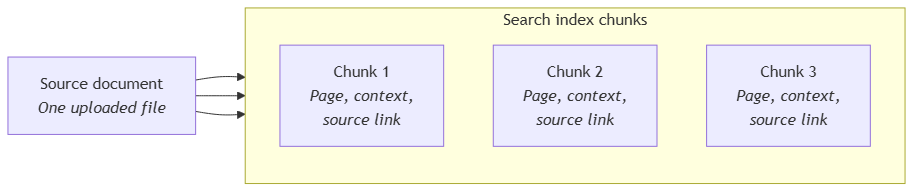
The structured document is then split into the retrievable units the search layer actually stores. The pipeline groups paragraphs and tables by page, applies a character cap so no chunk is too large for the model that will later consume it, and adds a small overlap between consecutive chunks. The overlap matters because an answer that happens to straddle a chunk boundary would otherwise get cut in half, and the user would see a confidently incomplete reply with no clue that anything was missing.
3. Tabular handling
Spreadsheets and CSV files are not prose, so they cannot be processed like prose. Their row and column relationships are extracted at the moment of upload, before any PDF conversion can flatten them, and stored as a row-group sidecar. The indexing pipeline reads that sidecar instead of running the layout reader on the spreadsheet, so an Excel file or a CSV lands on the index as structured row chunks rather than as a wall of comma-separated text. This is what makes a question like “what was the delivery quantity for supplier X in March?” answerable without forcing the model to reconstruct the table from scratch.
4. Figure detection and cropping
For documents that carry visual content (engineering drawings, floor plans, charts, slides full of diagrams), the layout step has already identified figure regions on the page. The pipeline then crops those regions out as separate images and stores them alongside the document so they can be cited, displayed, and reprocessed without going back to the original file. Near-duplicate figures are collapsed into one, so the system does not pay to caption the same logo or recurring header fifty times. This step is what gives the next one something to work with.
5. Figure captioning
Each cropped image is then sent to a vision-capable model that describes it as a short caption. The caption becomes searchable text alongside the surrounding paragraph, so a floor plan, an engineering drawing, or a financial chart contributes to retrieval the same way a written paragraph would. This is where the visual content of a document stops being invisible to the search layer, and where the business value of those images finally enters the index.
6. Per-chunk context
Per-chunk context is what fixes the “as defined in Section 3.2 above” problem. Before each chunk is indexed, a short summary of where it sits within the parent document is generated and attached to it, so the chunk carries its own context with it. When that chunk is retrieved later by a chat answer or an extraction, the surrounding context is already there, and the result is interpretable on its own without forcing the system to retrieve more of the document just to understand what the chunk refers to.
7. Vector embedding
Once the chunk text and its context are ready, the last step encodes the chunk into a numerical representation that captures its meaning. The search layer relies on that representation to answer questions where the user describes an idea using different words from those in the document, so without this encoding the semantic side of search cannot work at all.
The pipeline backbone behind these steps
These steps run automatically on every new or changed document, without anyone clicking a button. The pipeline is incremental, so it only processes what has actually changed since its last run, which keeps the cost predictable as the document estate grows. It is also scoped to the same containers the storage layer uses, so the permission boundaries from the document home carry through unchanged into what becomes searchable and what does not.
When each step is load-bearing
A document estate is rarely homogeneous, and the steps above are not equally important for every document type, so it helps to know which step is load-bearing for which case.
If the estate is mostly PDFs with structured layout (contracts, reports, manuals), layout-aware reading and chunk shaping are the load-bearing pair, because most of the silent misses in that population come from broken table extraction, detached headings, and chunks cut at the wrong place. If a significant share is scanned PDFs without embedded text, the same pair is what saves the system from indexing empty chunks.
If the estate carries operational data in spreadsheets and CSV files (invoices, line items, registers), tabular handling is what decides whether those files become real searchable content or expensive token waste.
If the documents communicate through visuals (technical drawings, floor plans, slides full of diagrams), figure detection and figure captioning are what prevent the system from quietly ignoring everything inside the figures.
And once a document is long enough that any paragraph can refer to others around it (which covers most contracts, most reports, and most regulated documents), per-chunk context is what keeps retrieved chunks usable in isolation.
Vector embedding sits outside this conditional logic, in that the search layer depends on it regardless of document type. In practice, mixed estates need every step, because proportions shift document by document, and a step that is decorative for one type is load-bearing for another.

Reality check
These steps cost money. Each one is an extra model call (or several) during indexing, and the bill grows with the document estate. A pipeline with these steps is not cheap, but a pipeline without them is more expensive in a different way, because the answers above it have to be defended, corrected, and re-verified by humans for as long as the system runs.
Pipeline failures also have to be visible. A silently failing indexing step looks exactly like a missing document to the user, in that the answer is just incomplete and there is no error to point at, so a pipeline treated as fire-and-forget will keep producing silent misses behind a layer that everyone trusts more than they should.
The pipeline also does not replace governance. It does not fix bad scans, invent a tag vocabulary, or decide which documents are worth indexing in the first place, and a well-designed pipeline only amplifies whatever discipline already exists upstream.
Conclusion
The indexing pipeline is the part of an AI document system most organizations underestimate, because storage is visible and chat is the demo, while the pipeline sits between them with nothing in the UI to mark its presence. Most teams treat it as a checkbox until the silent misses start showing up in answers nobody can explain.
The steps inside the pipeline (layout-aware reading, chunk shaping, tabular handling, figure detection and captioning, per-chunk context, vector embedding) decide what the AI is allowed to know about the documents it sits on top of. Treated as a designed layer in its own right, the pipeline makes the answers above it defensible, and treated as plumbing, it widens the gap between “the document is in the system” and “the system can actually use it” with every new document that comes in.
The technical pair for this piece is Building the indexing pipeline that decides what your AI can find.
Ideas, opinions, and tone are mine. AI helped with the language.
For more articles on AI-native document management visit the pialgorithms blog.
pialgorithms | document management software | ai engineering services